Provide customers, employees, and partners with centralized digital access to service requests, knowledge bases, forms, orders, and status information.
The EcholoN Self-Service Portal connects the portal interface directly to ticket processing, custom workflows, and roles and permissions. As part of the EcholoN Service Management Platform, requests are not only received but also recorded in a structured manner, automatically routed, and processed in a traceable way.
Digitize Self-Service Processes End-to-End with EcholoN
With the EcholoN Self-Service Portal software, you can deliver digital services centrally and tailored to specific target groups.
- Record inquiries in a structured format as tickets
- Provide knowledge articles and self-help content
- Digitally map forms and service catalogs
- Manage orders and approvals
- Display processing statuses transparently
- Support customers, employees, and partners based on their roles
- Automatically trigger custom workflows
- Connect customer service, IT, HR, and other departments
EcholoN thus creates a central digital gateway to various services. Users can find the right information or process more quickly. Service teams receive more complete requests and can process them more efficiently.
What is self-service portal software?
Self-service portal software provides customers, employees, and partners with centralized digital access to information, services, and processes. For example, users can submit requests, track tickets, view knowledge base articles, fill out forms, or place orders.
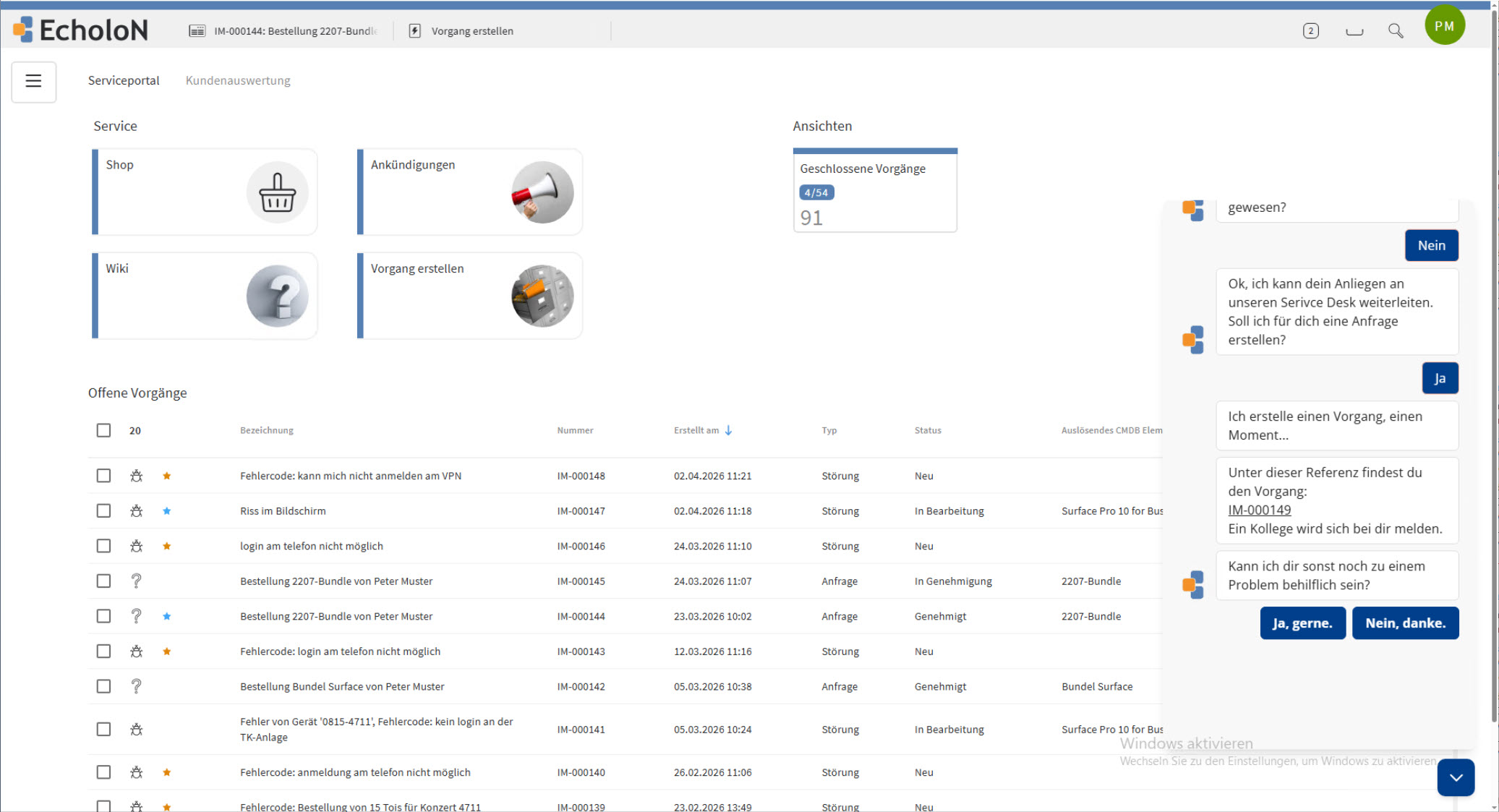
Unlike a simple FAQ page, the EcholoN Self-Service Portal is directly integrated with the EcholoN Ticket System, the EcholoN Workflow Engine, and role-based permissions. This not only provides information but also digitally initiates, manages, and documents complete service processes.
To learn more about the definition, benefits, and best practices, read the article “What Is Self-Service?”.
The Key Difference
A simple FAQ page provides information. The EcholoN self-service portal links information to tickets, forms, orders, approvals, and custom workflows. This allows users not only to find answers, but also to independently initiate and track entire service processes.
For which areas is the EcholoN Self-Service Portal suitable?
The portal can be used for various internal and external service areas. Which information, forms, and functions are visible is controlled via roles and permissions.
Customer Service
Customers can submit support requests, complaints, and service requests in a structured manner, retrieve information, and track the processing status of their cases.
Typical processes:
- Support request
- Complaint
- Inquiry about a product or service
- Status check
- Submission of documents and attachments
- Rating of a completed case
IT Service Management
Employees have centralized access to IT services, incident reports, service requests, and orders.
Typical processes:
- Report an incident
- Submit a service request
- Request hardware or software
- Request access permissions
- Search the IT knowledge base
- Check ticket status
HR Service Center
HR-related services and recurring requests can be provided via digital forms and defined workflows.
Typical processes:
- Request a certificate
- Report a change to master data
- Submit a personnel form
- Submit documents
- Create an HR request
- Track processing status
Facility Management and Maintenance
Incidents, repairs, and other building-related services can be reported centrally and forwarded directly to the responsible departments.
Typical processes:
- Repair request
- Incident report
- Room Request
- Key Request
- Maintenance Order
- Report Regarding Buildings or Properties
Purchasing and Internal Services
Ordering, approval, and administrative processes can also be provided in a structured manner via the portal.
Typical processes:
- Requirement Request
- Order
- Approval
- Fleet Request
- General Administrative Request
- Status Tracking
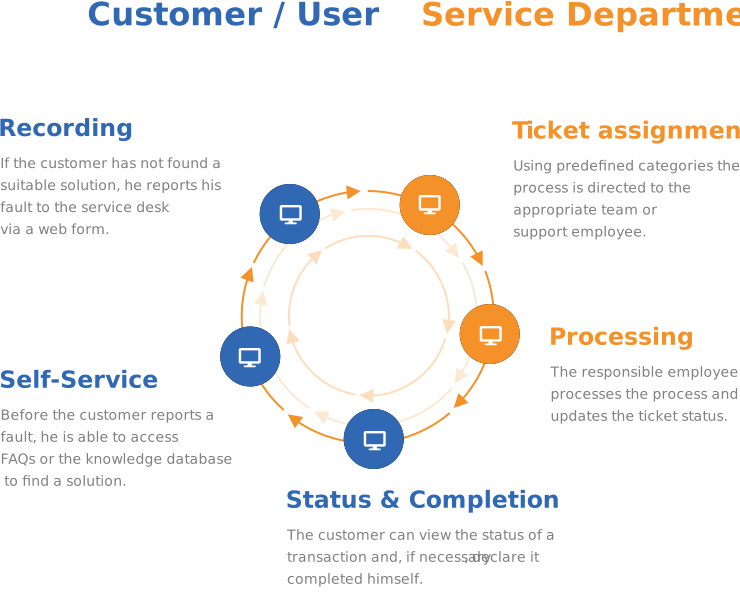
How the EcholoN Self-Service Process Works
-
1. Choose the right service
1The user selects a category, a form, an item or a service provided.
-
2. Recording information in a structured way
2Mandatory fields, drop-down menus and attachments ensure that all the necessary information is entered straight away.
-
3. Start a ticket or workflow automatically
3EcholoN creates the appropriate task and initiates the designated workflow depending on the category, role and process.
-
4. Managing responsibility and processing
4Enquiries can be automatically categorised, prioritised and forwarded to the relevant team.
-
5. Provide transparent information on status and results
5Users can track the progress of their requests on the portal, receive feedback and rate completed services.
End-to-end process
Select a service → Enter details → Create a ticket or start a workflow → Assign responsibility → Track status → Rate the service
Key Features of the EcholoN Self-Service Portal Software
Guided Ticket Creation
Customers, employees, and partners can submit inquiries, issues, complaints, or service requests directly through the portal.
Inquiries submitted through the portal are processed immediately in the EcholoN ticket system. Categories, required fields, and predefined options guide the user through the submission process.
Attachments such as documents or screenshots can be added directly. This ensures that the responsible service team receives the necessary information right from the start.

Ticket Status and Communication
Users can track the status of their requests and assign responses directly to the respective ticket.
This reduces the number of status inquiries made by phone or email and creates transparency regarding ongoing service processes.

Knowledge Base, FAQ, and Self-Help
Through the integrated knowledge base, FAQ sections, and self-help articles, users can find answers to common questions on their own. These include, for example, instructions, suggested solutions, product information, process guidelines, and internal support resources.
This reduces the number of recurring standard inquiries. Users receive help more quickly, while service staff gain more time for complex issues, personalized advice, and value-added tasks.

Role-Based Portal Views
Not every user group needs the same information and features. EcholoN uses roles and permissions to control which modules, forms, knowledge content, and processes are visible.
This allows different views to be provided for customers, internal employees, partners, or individual departments.

Forms and Service Catalogs
Standardized forms ensure that requests are recorded completely, consistently, and in a traceable manner.
Services can be provided through structured catalogs. Users select the service they need and are then guided through the appropriate process.

Shopping Cart and Ordering Processes
Items, replacement parts, IT equipment, or internal services can be requested using a shopping cart feature.
The order is then processed as a structured transaction and can be linked to an approval process if necessary.
Approval Workflows
Requests requiring approval are automatically forwarded to the appropriate individuals or groups via the EcholoN Workflow Engine.
The approval process can be customized based on category, role, organization, or request.
Search, Chatbot, and Automated Support
A powerful search function helps users quickly find relevant information, FAQ entries, knowledge base articles, or forms. In addition, chatbot features can automatically answer simple questions or guide users to the correct service process.
This improves user guidance within the portal and reduces unnecessary contact with the service team. Common issues can be resolved more quickly, standardized processes can be better managed, and service resources can be deployed more effectively.
Feedback and Ratings
After a transaction is completed, users can rate the service provided.
Rating criteria can be defined individually. This allows, for example, customer satisfaction, service quality, and areas for improvement to be systematically tracked.
Message Board and Latest Updates
Important information, service disruptions, or current notices can be posted directly on the portal via the message board.
Start and end times can be set for these announcements. This ensures that users receive the latest information before they submit a new request.

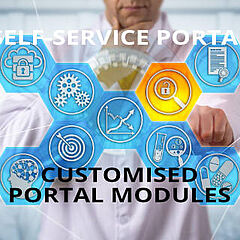
Custom Portal Modules
In addition to traditional self-service functions, other business processes and modules can be integrated into the portal.
These include, for example:
- HR Services
- Project and Task Management
- Fleet Management
- Internal Administrative Requests
- Facility Services
- Customized Departmental Processes
Your Benefits with the EcholoN Self-Service Portal
Fewer Recurring Standard Inquiries
FAQs, knowledge articles, and self-help content help users answer common questions on their own.
- This gives service staff more time to address complex issues and provide personalized advice.
More complete and better-structured inquiries
Guided forms and required fields ensure that important information is provided right from the start.
- This reduces the need for follow-up questions and makes it easier to assess, prioritize, and process inquiries.
Greater transparency for users
Customers, employees, and partners can independently track the status of their requests in the portal.
- This reduces the number of manual status inquiries and gives users a better overview of their ongoing processes.
End-to-end digital processes
Requests, orders, approvals, and feedback are not handled in isolation but are routed directly into defined workflows.
- This reduces media discontinuities and unstructured coordination via email.
A single portal for various service areas
Customer service, IT, HR, facility management, and other departments can work together on a shared platform.
- Roles and permissions ensure that each user group sees only the content and services intended for them.
Why Choose EcholoN as Your Self-Service Portal Software?
No Isolated Portal Interface
The portal is part of a comprehensive service management solution.
- Ticket processing, workflows, knowledge base, roles, permissions, and reporting are all seamlessly integrated within EcholoN.
Customizable processes
Forms, screens, categories, roles, and workflows can be tailored to the company’s specific requirements and workflows.
- This means companies do not have to completely adapt their processes to a rigid portal structure.
For Internal and External Services
EcholoN can be used for customer portals as well as for employee, partner, and departmental portals.
- Different use cases are mapped within a single shared platform.
More Than Just a Knowledge Platform
Users can do more than just search for information. They can initiate complete service processes, submit documents, place orders, request approvals, and track the processing status.
Expandable in Stages
Companies can start with selected portal roles or service processes and gradually expand the scope of functionality.
- Additional departments and custom modules can be added based on the flexible EcholoN solution platform.
Integration with Enterprise EcholoN Service Management
The EcholoN Self-Service Portal is directly integrated into the EcholoN-platform.
Requests, forms, orders, and feedback from the portal can be immediately transferred into structured service processes. If necessary, a request can automatically generate a ticket.
Depending on the specific process, the following information and rules—among others—can be taken into account:
- Category
- Priority
- Responsibility
- User Role
- Service Level
- Approval
- Schedule
- Process Flow
- Linked Configuration Elements
- Knowledge Base Content
The workflow engine then controls the specified processing and approval steps. All relevant information remains assigned to the respective process and is traceably documented.
The EcholoN self-service portal in practice
Companies such as Bünting and HORNBACH use EcholoN to centrally manage service requests, record tickets in a structured manner, and provide transparency regarding their processing status.
- Bünting: Self-service rollout to 210 stores
- HORNBACH: Centralized access for IT support requests and status tracking
- McDonald's: Self-service portal for all inquiries, spare parts orders, and maintenance requests at more than 1,400 restaurants
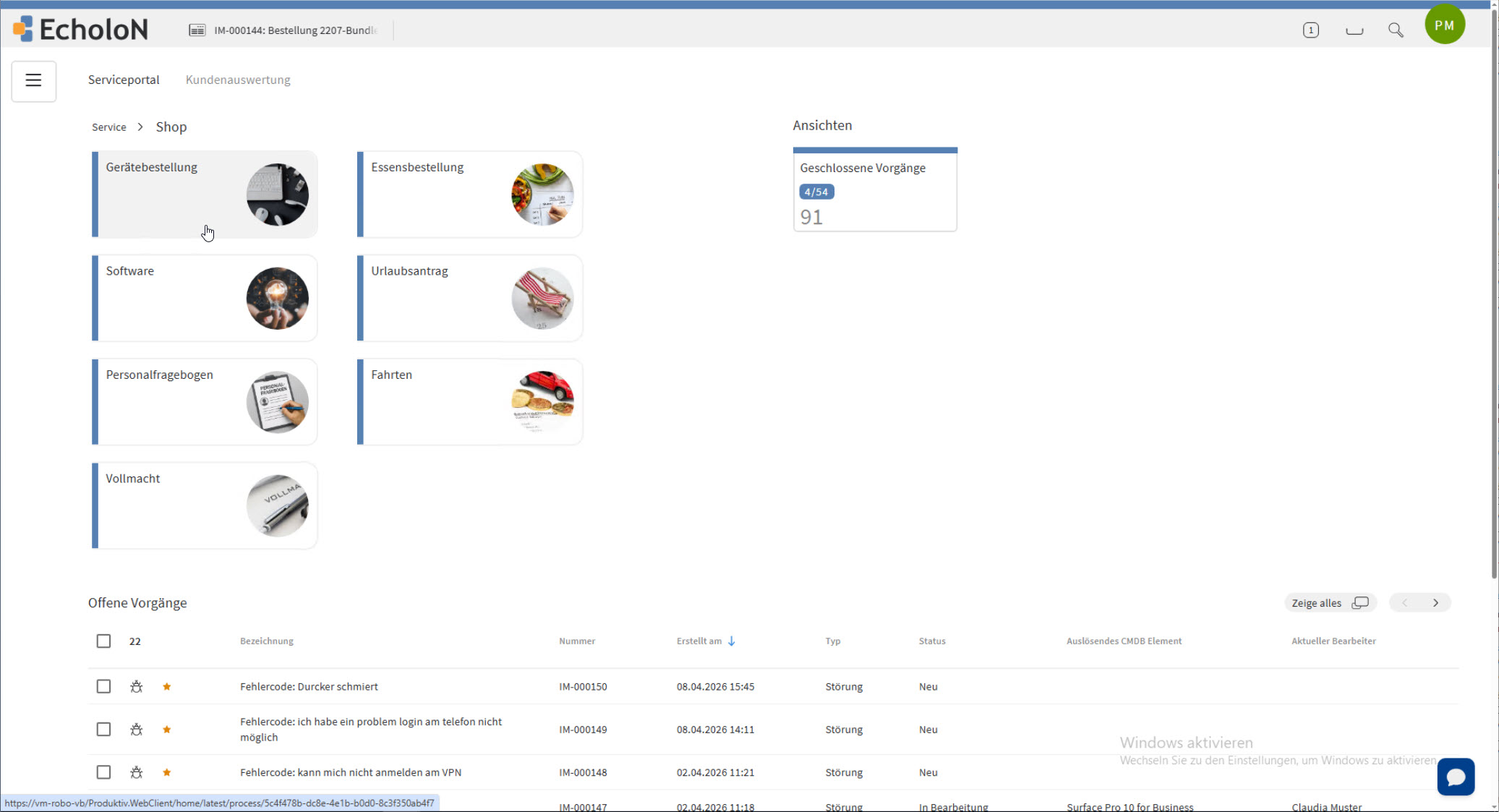
IT Service Portal with Ticket Tracking, Self-Help, Online Store, and Chatbot
Employees can report IT issues and service requests, find relevant knowledge base articles, or order approved services directly through a role-based portal view.
Ordering Process with Shopping Cart and Approval
Users select an item or service. EcholoN handles the structured data entry and, if necessary, initiates the designated approval process.
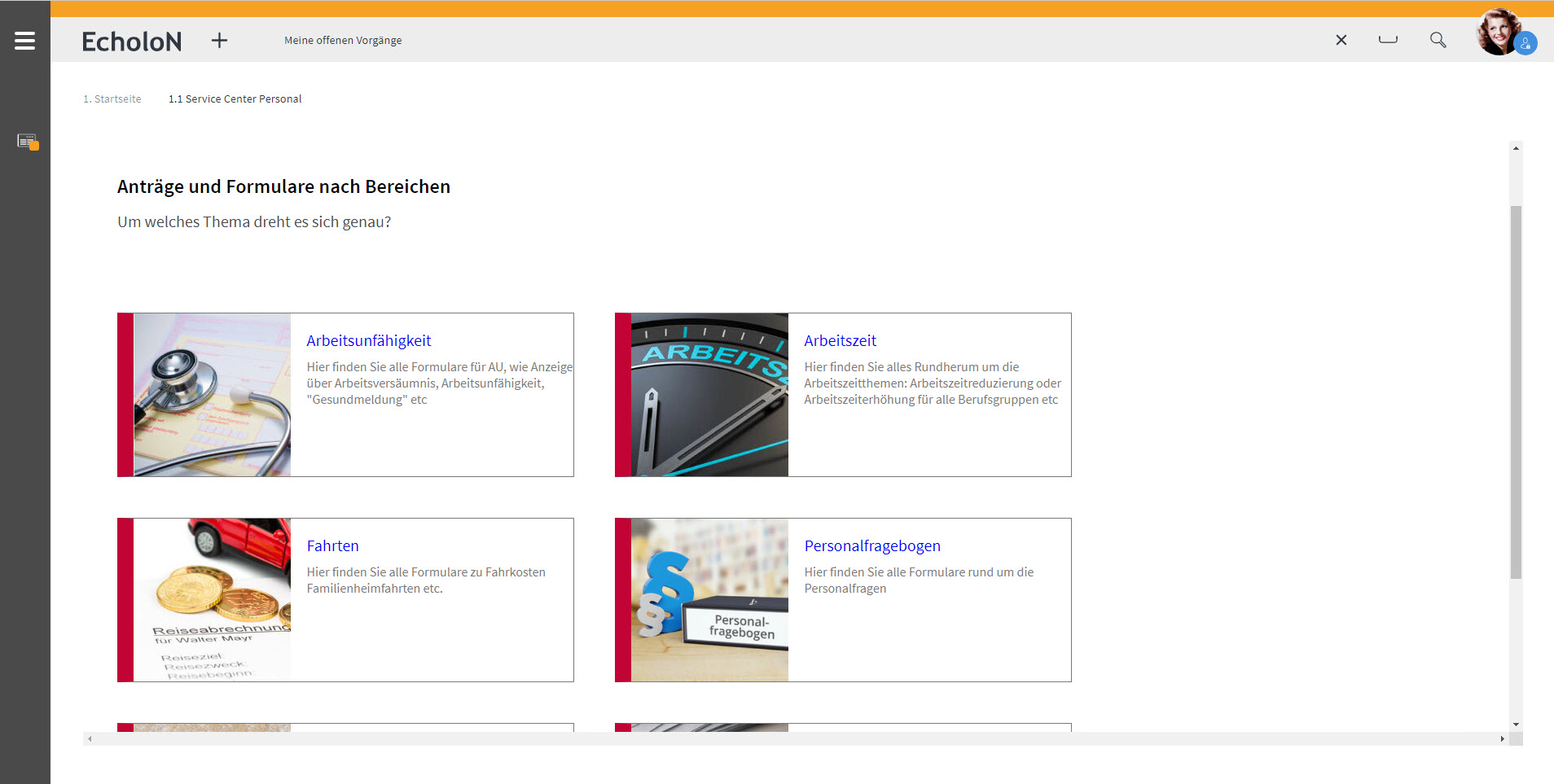
Employee Portal for HR Services
Employees can access HR forms, internal information, and defined HR processes. Requests and documents are automatically assigned to the relevant process.
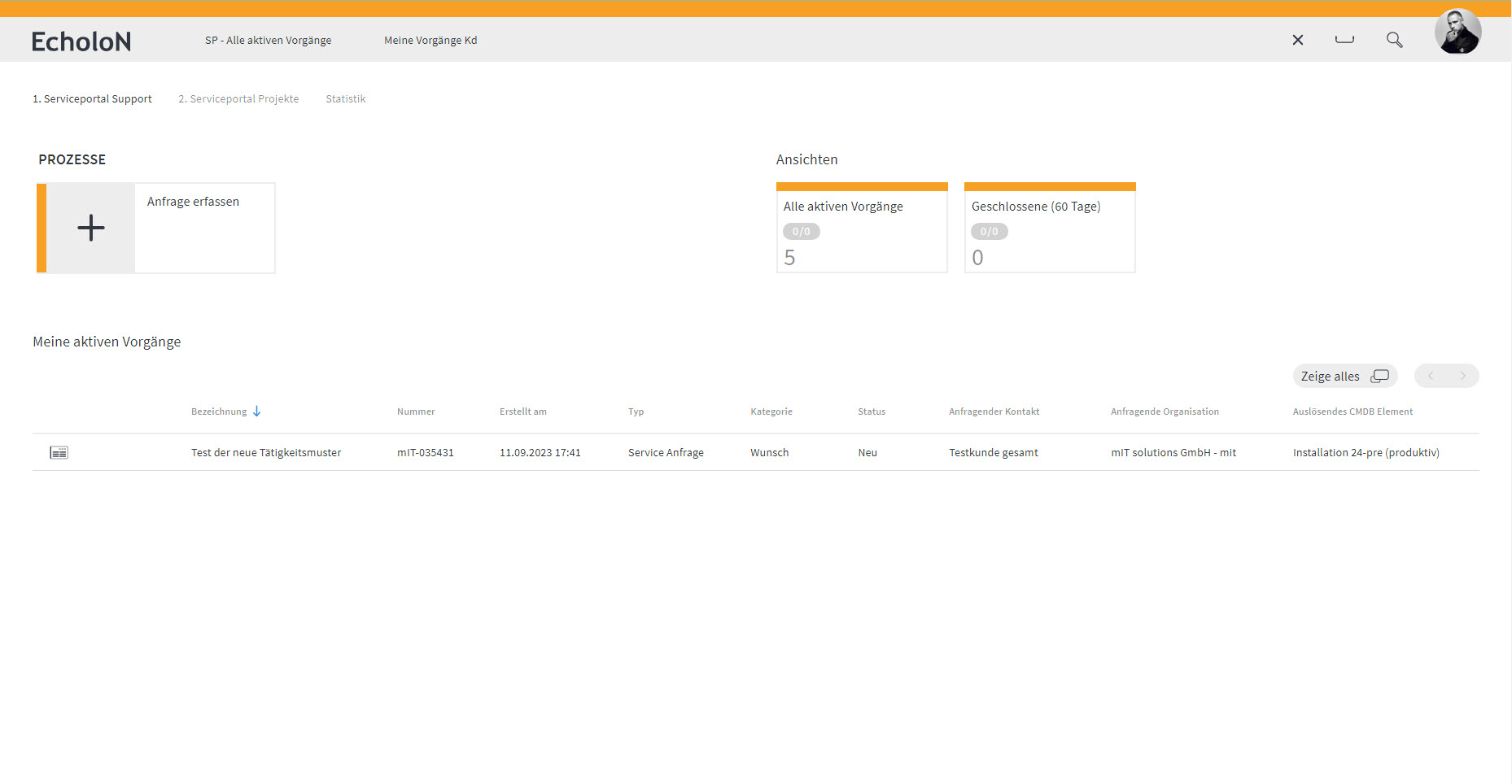
Customer portal for service enquiries
Customers submit enquiries via structured forms, track the processing status and communicate directly within the relevant case.
Implementation of the EcholoN Self-Service Portal
The specific design of the portal is tailored to your company’s user groups, services, and processes.
Typical steps in the implementation process include:
- Define user groups and portal roles
- Select relevant service processes
- Define forms and categories
- Set up roles and permissions
- Map workflows and responsibilities
- Provide knowledge articles and self-help content
- Configure portal views
- Test selected processes
- Gradually activate users
- Continuously improve usage and service quality
mIT solutions GmbH provides support for the design, configuration, implementation, and further development of the EcholoN solution.
Key Technical Specifications
|
Frequently Asked Questions About Self-Service Portal Software
What is self-service portal software?
Self-service portal software provides customers, employees, or partners with a central digital gateway to information, services, and processes. Users can submit requests, track tickets, access knowledge articles, fill out forms, or place orders.
For which areas is the EcholoN Self-Service Portal suitable?
The portal is suitable for customer service, IT service management, HR service centers, facility management, maintenance, procurement, and other internal services, among others. Custom portal views can be provided for each area using roles and permissions.
Can the portal be customized to fit our processes?
Yes. Forms, categories, roles, permissions, portal modules, and workflows can be configured according to the company’s requirements.
Is the portal connected to the EcholoN ticket system?
Yes. Requests from the portal can be recorded directly as tickets, categorized, prioritized, and forwarded to the responsible teams via defined workflows.
Can customers and employees have different views?
Yes. Roles and permissions control which information, forms, modules, and services a user group is allowed to view and use.
Can orders and approvals be managed?
Yes. Items, services, or internal requests can be submitted via forms or a shopping cart feature. Processes requiring approval can then be routed through defined approval workflows.
Can EcholoN be used as both a customer portal and an employee portal?
Yes. EcholoN can be used for external customer services and for internal employee processes. Partner and departmental portals can also be set up using roles and custom portal modules.
Does the portal support a knowledge base and FAQs?
Yes. Knowledge articles, FAQs, and self-help content can be made available directly within the portal. This allows users to search for solutions before creating a new request.
Which EcholoN edition includes the self-service portal?
The Service Portal with self-help is integrated into the Express, Standard, Professional, and Enterprise editions. Which edition is suitable for a specific use case depends on the overall scope of the EcholoN solution required.
How does the implementation of a self-service portal work?
First, user groups, services, and processes are defined. Next, portal roles, forms, categories, permissions, and workflows are set up. After a testing phase, the portal can be gradually rolled out to the intended user groups.
Can the portal be connected to existing systems?
The self-service portal is integrated into the EcholoN platform. Which additional systems can be connected and what form of integration makes sense is determined based on the existing system landscape and the specific use case.
You Might Also Be Interested In
Is the EcholoN Self-Service Portal a good fit for your processes?
Let’s work together to determine which portal roles, features, and workflows make the most sense for your needs.
You’ll gain concrete insight into the EcholoN Self-Service Portal software and learn how your existing service processes can be mapped digitally.