With the EcholoN Service Desk Software, you can track and manage incidents, service requests, and other service processes through a central platform. Configurable workflows, clear responsibilities, and end-to-end SLA monitoring help your service teams handle all requests in a structured manner.
EcholoN is not limited to the traditional IT service desk. The same platform can also be used to manage technical support, customer service, and other internal and external service processes.
Made in Germany - Cloud, on-premises or hybrid - Scalable in stages - A bespoke demo tailored to your processes
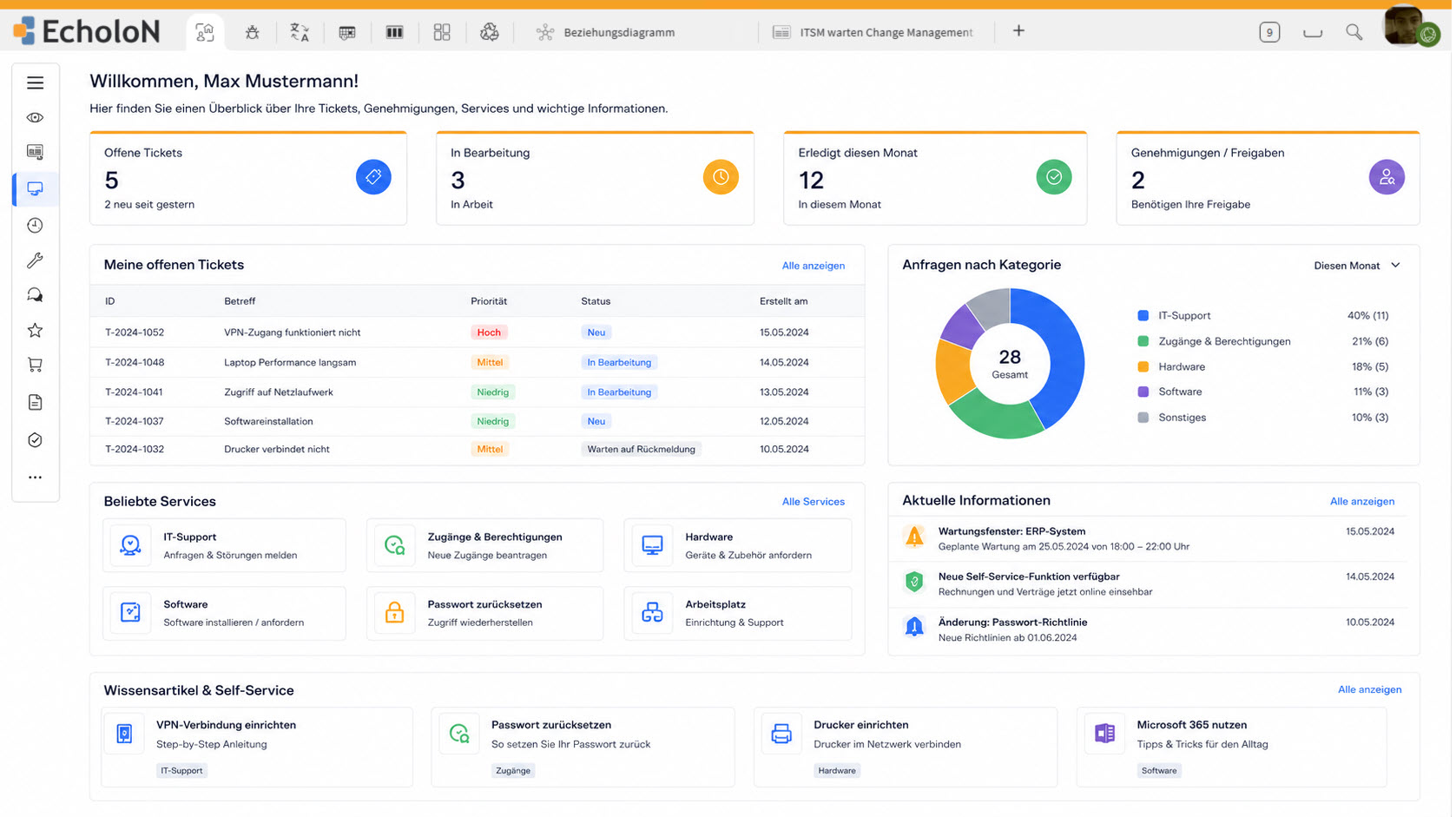
Centrally Manage Service Cases
Inquiries reach companies through various channels: via email, by phone, through a portal, or from integrated systems. Without a unified platform, media discontinuities, unclear responsibilities, and missing information can quickly arise.
EcholoN brings together cases, communication, responsibilities, deadlines, and process steps in a single, unified work environment.
Your service organization benefits from:
- centralized recording of inquiries and issues
- clearly defined responsibilities
- automated assignment and escalation rules
- transparent monitoring of SLAs and deadlines
- fewer manual routine tasks
- traceable communication
- immediately available process and solution knowledge
- meaningful service quality metrics
This creates a seamless service process from the first contact through to documented resolution.
A Platform for IT, Support, and Other Service Areas
The service desk is often the first point of contact. However, companies need more than just a solution for traditional IT tickets. Technical customer inquiries, internal services, approval processes, and cross-departmental support workflows must also be handled in a structured manner.
EcholoN integrates these processes on a shared service management platform. Forms, roles, workflows, service levels, and user interfaces can be configured for different use cases.
IT Service Management
Incidents, service requests, problems, and changes are linked to the corresponding services, configuration items, responsibilities, and SLAs.
For more information, visit the page on EcholoN IT Service Management Software.
Technical Support and Customer Service
Customer reports can be linked to products, devices, equipment, locations, or contracts. Tasks, deadlines, and escalations are managed based on the specific service case.
Customer and Partner Services
Inquiries from customers, suppliers, or business partners can be received through defined intake channels and forwarded in a controlled manner to internal departments.
Internal Corporate Services
Services from HR, administration, facility management, or shared services can also be provided via forms and service catalogs.
The initial implementation can be limited to a single service desk. Additional teams and processes can then be gradually added on the same technical foundation.
EcholoN positions its solution accordingly as a modular service management platform for IT, technical service, and customer management.
EcholoN in Practice
ITSM and Service Catalog at Aveniq
Aveniq uses EcholoN as a strategic tool to improve collaboration with customers and service quality. As part of the solution, the service catalog for major customers was also expanded.
From IT Services to Logistics Services at HORNBACH
HORNBACH replaced an outdated ticketing system with the process-oriented EcholoN service management platform. Following its implementation in IT service management, plans were made to extend it to logistics services.
This example demonstrates how an ITSM implementation that was initially clearly defined can be expanded to other service areas.
How the Service Desk works in six steps
-
1. Record the enquiry centrally
1Enquiries can be received via email, telephone, the self-service portal or through integrated systems.
EcholoN consolidates the relevant information into a single central case. Users, customers, affected services or technical objects can be assigned immediately.
Customisable forms ensure that the information required for each case is recorded in a complete and structured manner.
-
2. Categorise and prioritise tasks
2Incoming incidents are categorised and prioritised according to defined criteria. Factors such as incident type, the service affected, impact, urgency or user group may be taken into account.
As a result, critical faults are handled differently from regular service requests or general enquiries.
-
3. Determine jurisdiction automatically
3EcholoN can assign tickets based on teams, roles, locations, customers, services or other organisational criteria.
Unnecessary manual forwarding is reduced. The ticket reaches the relevant department more quickly and remains fully documented even when handed over.
-
4. Monitor SLAs and escalations
4Response, processing and resolution times can be managed depending on the service, priority, contract, customer or support hours.
EcholoN monitors deadlines and can automatically send a notification or initiate a defined escalation process if a deadline is at risk of being missed.
-
5. Provide targeted support for processing
5Work instructions, checklists, known solutions and knowledge content can be integrated directly into the processing workflow.
Tasks, approvals, queries and notifications are triggered in line with the respective process step.
-
6. Document and evaluate the results
6Resolution paths, processing times, communication and activities are documented in a structured manner.
The data recorded is then available for use in reports, dashboards, quality analyses and the continuous improvement of service processes.
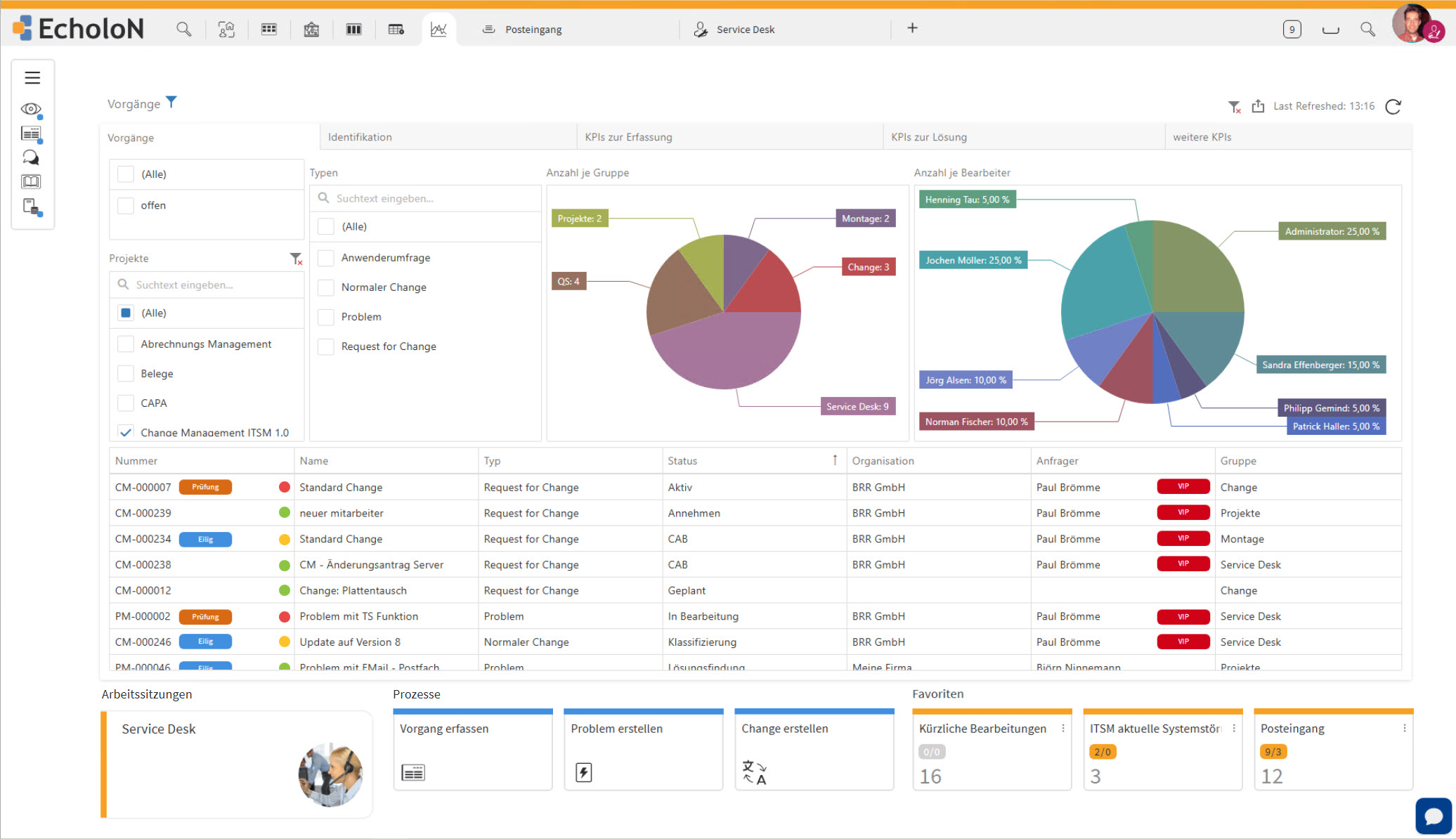
EcholoN Service Desk Cockpit: Ticket creation with requester, category, service and priority.
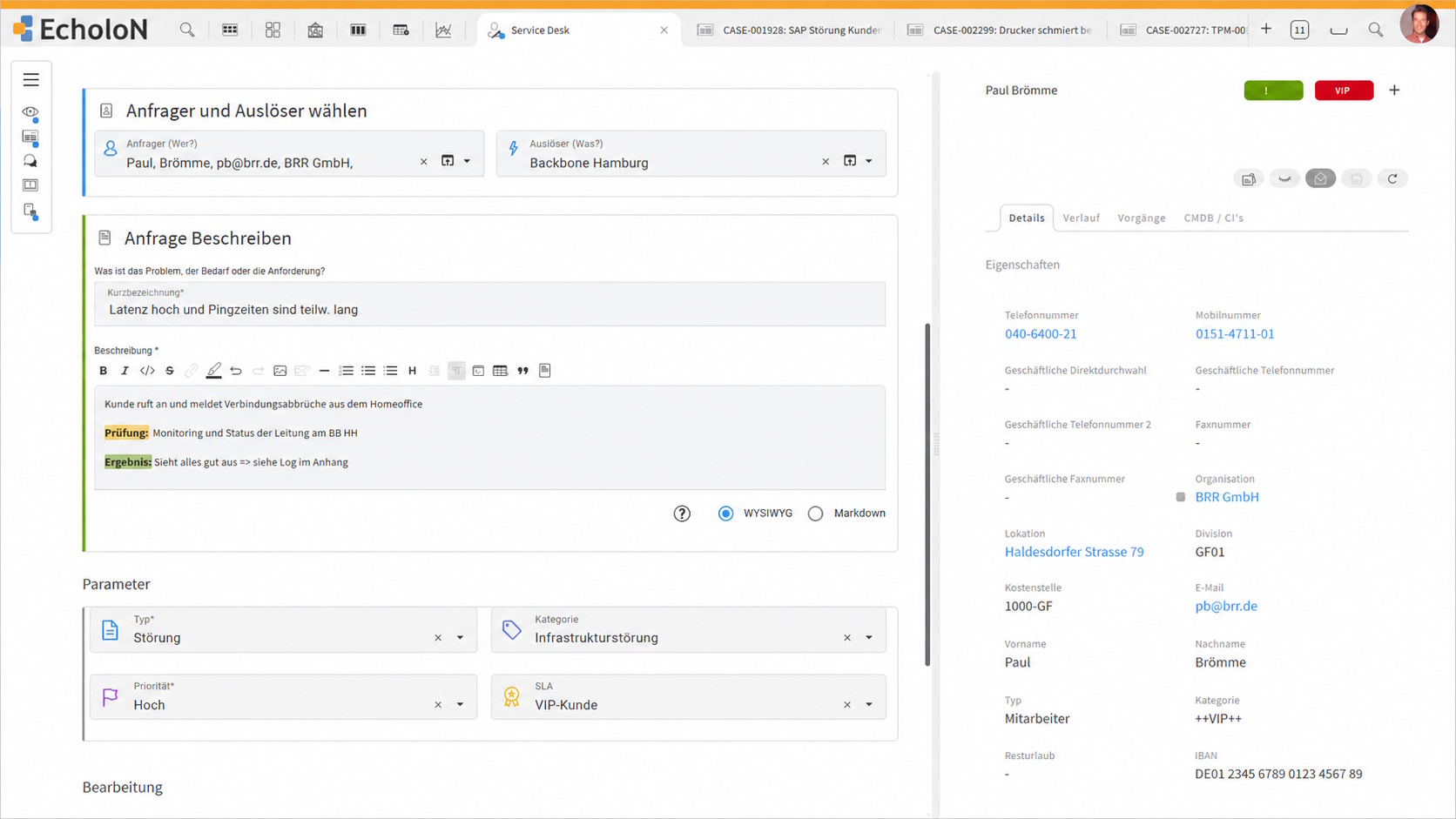
EcholoN Service Desk Cockpit: Overview and task list showing SLA status and at-risk tasks
Key Features of the EcholoN Service Desk Software
Ticket and Case Management
EcholoN provides all relevant information about a service case in a centralized case view:
- Status and priority,
- Requester and affected organization,
- Responsible teams and agents,
- Communication history,
- Tasks and approvals,
- Response and resolution deadlines,
- Affected services and objects,
- attachments and documents,
- and related cases.
Unlike a simple ticket system, the Service Desk links individual tickets to services, workflows, knowledge, responsibilities, and follow-up processes.
Incident Management
EcholoN Incident Management supports the structured recording and handling of incidents.
The requester, affected service, and configuration item can be assigned to the incident. Impact and urgency help with prioritization. Case templates, previous solutions, and knowledge base content assist in the rapid restoration of the affected service.
If an incident cannot be resolved immediately, it is forwarded in a controlled manner to the responsible specialist team.
Service Request Management
Standardized requests such as authorizations, purchase orders, access requests, or internal services can be processed via defined request workflows.
Custom forms, tasks, approvals, and workflows can be defined for each service. This ensures that recurring requests are handled consistently and transparently.
SLA and Escalation Management
Service Level Agreements can be configured based on service, priority, contract, customer, or support calendar.
Automated monitoring and escalation management help ensure compliance with agreed-upon response and resolution times.
Dashboards can display, among other things:
- open and at-risk cases,
- upcoming SLA violations,
- overdue tasks,
- ticket volume by time period or category,
- processing and resolution times,
- team and employee workload.
Workflow Automation
The EcholoN Workflow Engine handles recurring process steps.
Depending on status, priority, role, or previous inputs, the system can, among other things:
- create and assign tasks,
- obtain approvals,
- check conditions,
- send notifications,
- calculate deadlines,
- trigger escalations,
- initiate follow-up processes,
- and document decisions.
EcholoN combines configurable processes with updatable standard software. Customizations can be implemented through dedicated extension modules.

Self-Service Portal and Service Catalog
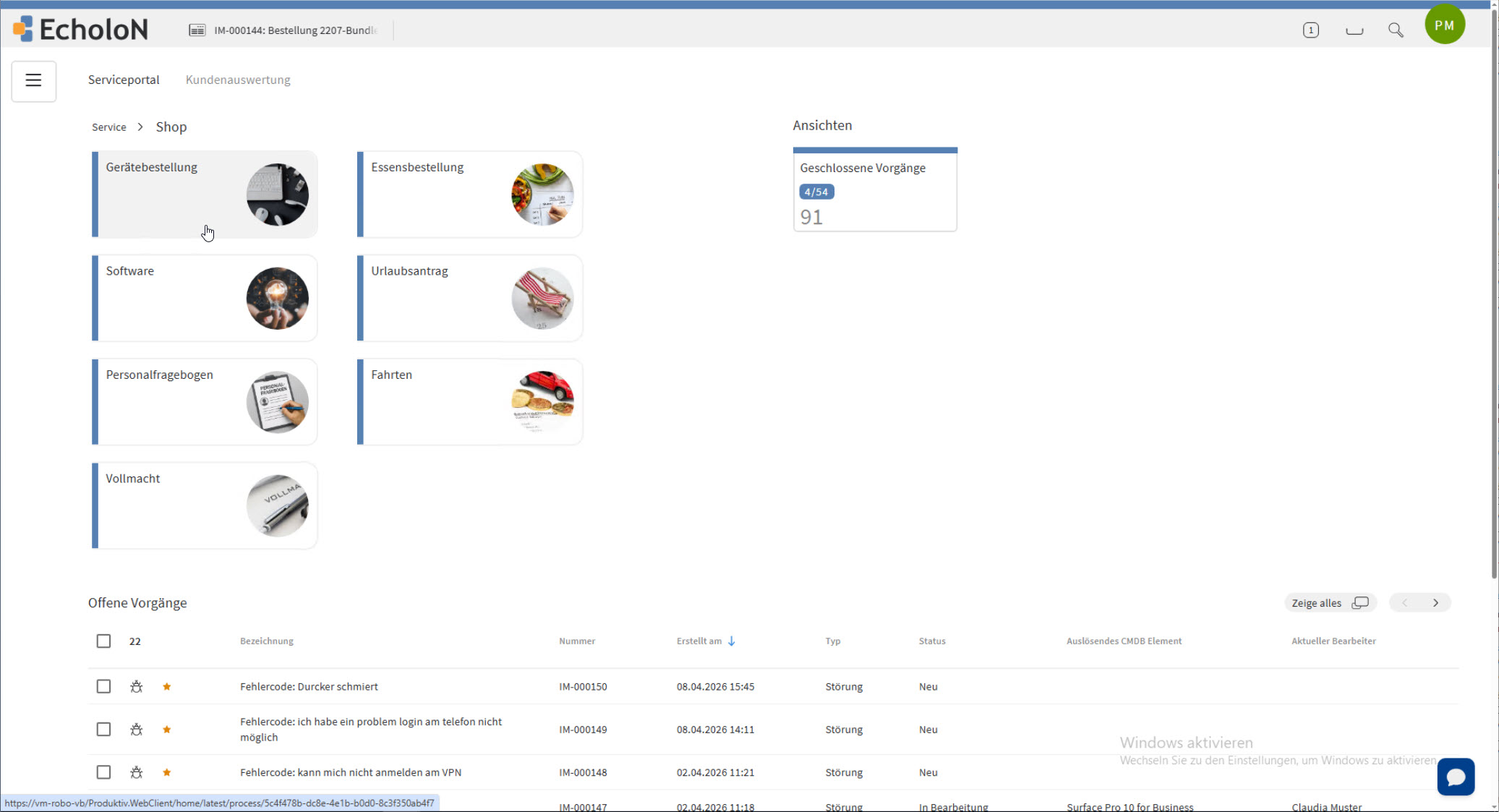
Through the EcholoN Self-Service Portal, customers, employees, and partners have centralized access to services and information.
Users can:
- select services,
- fill out guided forms,
- report issues and requests,
- view their own cases,
- answer follow-up questions,
- track processing statuses,
- and access approved knowledge content.
The portal is directly integrated with ticket management, the workflow engine, and role-based permissions. As a result, a request is not only received but immediately routed to the appropriate processing workflow.
Knowledge Management
The EcholoN knowledge base centrally provides guides, known solutions, checklists, and process knowledge.
Content can be made available to service staff while they are handling cases or to users via self-service.
This supports:
- a higher first-time resolution rate,
- consistent service quality,
- faster onboarding of new employees,
- fewer recurring inquiries,
- the expansion of self-service offerings.
Problem and Change Management
Recurring incidents can be grouped in Problem Management and analyzed for common causes.
Known errors and workarounds are then available for future cases. If a technical or organizational change is required, this can lead to a defined change process.
Incidents, problems, and changes remain linked to one another rather than being handled in separate tools.
Asset and Configuration Information
Tickets can be linked to devices, applications, equipment, locations, or other configuration items.
This allows the agent to identify:
- which object is affected,
- which previous cases are related,
- which organization or user is assigned,
- which services or contracts apply,
- and which other components are related.
Reporting and Dashboards
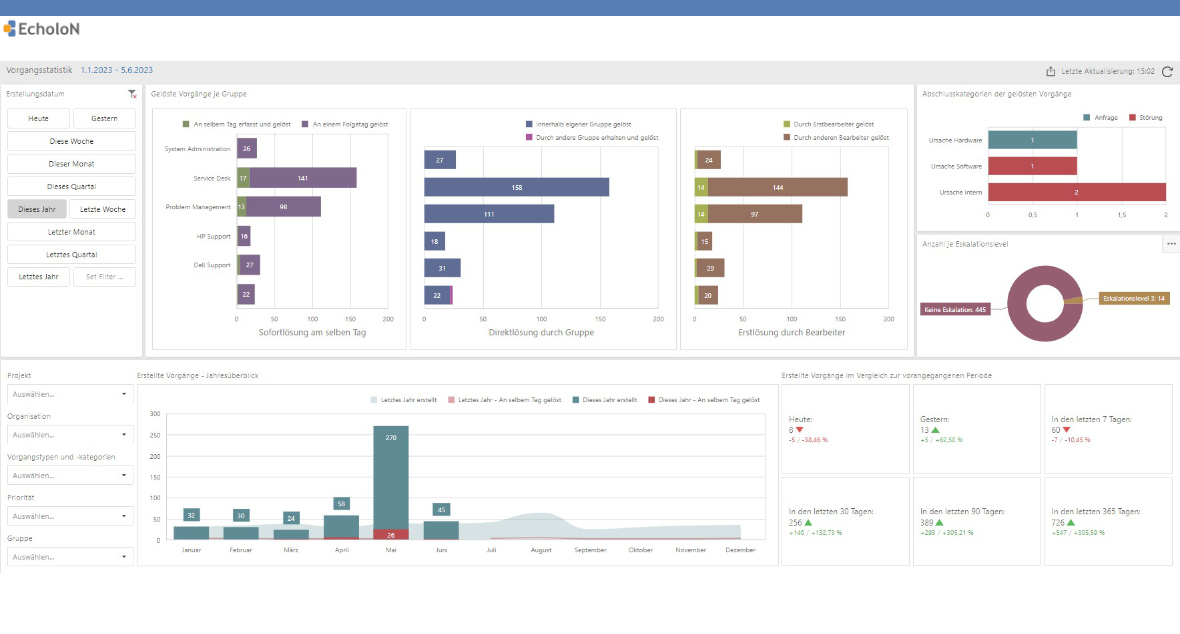
EcholoN prepares operational service information for different roles.
Possible reports include:
- open cases by priority and status,
- ticket volume by time period and category,
- average response and resolution times,
- compliance with agreed-upon service levels,
- at-risk and escalated cases,
- recurring causes of outages,
- team and agent workload,
- use of self-service and knowledge base content.
Possible Applications on a Shared Platform
EcholoN’s breadth does not stem from a random collection of individual functions. Different service areas operate on a shared technical foundation, but each has its own forms, roles, processes, and user interfaces.
Internal IT Service Desk
An employee reports an issue. EcholoN assigns the service, priority, SLA, and responsible team. Processing, communication, and resolution are documented in the case.
Technical Customer Service
A customer report is linked to a contract, product, asset, or location. Checks, tasks, and escalations are managed based on the affected object and the agreed-upon service.
Internal Corporate Services
Employees request a service via a service catalog. The form, required approvals, and follow-up tasks are determined by the selected service.
Managed Services
Multiple customers, contracts, support hours, service levels, and responsibilities are managed separately within a single platform.
Shared Service Center
Different departments provide their services through shared intake channels. Functionally separate roles and processes ensure that each case is handled by the appropriate department.
Flexible Configuration Instead of a Rigid Standard Model
Service organizations differ in terms of their responsibilities, services, approval rules, and contractual requirements.
With EcholoN, you can configure the following, among other things:
- Forms and required fields
- Status models and process steps
- Tasks and approvals
- Roles and permissions
- Teams and responsibilities
- Service levels and escalations
- Customers and organizational units
- Locations and languages
- Service catalogs and portal roles
This allows different business units to work on a single platform without having their specific requirements forced into an identical standard process.
Integrations and Data Connectivity
A service desk requires up-to-date information from user management, infrastructure, business systems, and communication channels.
EcholoN can be connected to the following areas, among others:
- Email systems
- User and directory services
- Monitoring and reporting systems
- ERP and CRM applications
- Asset and configuration data sources
- Telephony and communication solutions
- Other specialized applications
The EcholoN Data Workflow System is available for data migrations and cross-system processes. It supports the import, cleansing, and transformation of data from existing systems.
Depending on requirements, the connection can be established via an existing standard component, a defined interface, or a project-specific integration.
Why Choose EcholoN as Service Desk Software?
A Platform Instead of an Isolated Standalone Solution
Tickets, services, processes, knowledge, assets, contracts, communication, and reports are all interconnected.
Configurability Instead of a Rigid Standard Template
Different departments, customers, roles, and process models can be mapped within a single shared platform.
IT and Other Service Areas on a Single Platform
Implementation can begin with the IT Service Desk and then be expanded to include customer service, technical support, or internal corporate services.
Seamless Process Integration
Incidents, service requests, problems, changes, knowledge, and configuration items remain linked throughout the entire processing workflow.
Phased Implementation
Organizations can start with a defined use case and later expand the scope of functionality to include additional processes, teams, or portals.
Flexible Operating and Integration Models
Cloud, on-premises, and hybrid scenarios, as well as the integration of existing systems, support a variety of organizational requirements.
Service Desk, Help Desk, and Ticket System: A Concise Overview
| Solution | Primary Focus |
|---|---|
| Ticketsystem | Record, assign, and track cases |
| Helpdesk-Software | Operational support for questions and issues |
| Service Desk | Service Desk Centrally manage incidents, service requests, SLAs, and other service processes |
| IT Service Management | Plan, deliver, and improve IT services across the board |
| Service Management Software | Integrate IT and non-IT service processes on a single platfor |
A Service Desk typically utilizes the functions of a ticketing system but goes beyond it both organizationally and functionally. It links individual cases to defined services, responsibilities, service levels, and related processes.
Communication within the Service Desk

Frequently Asked Questions About Service Desk Software
Is EcholoN only suitable for the IT service desk?
No. The IT service desk is a typical starting point. Technical support, customer service, and other internal or external service processes can also be managed on the same platform.
Can multiple departments work on a single platform?
Yes. Different departments can have their own forms, roles, permissions, workflows, and user interfaces. At the same time, cross-departmental processes and handoffs can be managed centrally.
Can EcholoN be implemented in phases?
Implementation can begin with a specific process or team. Additional services, departments, portal roles, and processes can be added later.
How customizable are workflows?
Workflows can include tasks, conditions, approvals, notifications, deadlines, and escalations, among other elements. The specific structure depends on the respective service process.
Can existing processes be migrated?
Existing forms, status models, responsibilities, and escalation paths can be analyzed and mapped within EcholoN. In doing so, it’s important to assess which processes can be adopted, simplified, or standardized.
What operating models are available?
Depending on technical and organizational requirements, EcholoN can be deployed as a cloud, on-premises, or hybrid solution.
Which systems can be integrated?
Integration depends on the specific system and the required data exchange. Options include existing standard components, defined interfaces, or project-specific integrations.
Does EcholoN support ITIL-based processes?
EcholoN supports processes for incident, problem, change, service request, and service level management, among others. The specific configuration can be tailored to the organization.
Service Desk Demo Based on Your Processes
Service desk software should not be evaluated solely based on a list of features. What matters most is whether it can clearly map out your responsibilities, services, and workflows.
In a customized demo, we’ll use a selected scenario to test, for example:
- the creation of an incident or service request,
- categorization and automatic assignment,
- SLA calculation and escalation,
- integration of knowledge and configuration information,
- tasks and approval workflows,
- self-service and status updates,
- reports and dashboards,
- and the ability to expand to additional service areas.
Also of interest
- Blog article: Single Point of Contact - SPoC
- Blog article: SPoC in IT Service Management
- Blog-Artikel: Dreiklang im Service: Ticketsystem - Helpdesk Software und Service Desk