With the EcholoN Workflow Engine, you can model, automate, and control business processes within a central software platform. Forms, tasks, roles, rules, and connected systems are linked to form traceable digital workflows.
Whether it’s an approval process, an automated system action, or a dynamic service case: EcholoN supports various workflow types and can be adapted to your organization, your processes, and your existing system landscape.
- Model business processes graphically
- Automate tasks and decisions
- Dynamically integrate forms into processes
- Connect users, roles, and external systems
- Monitor process statuses and open tasks
- Control versioning and deployment of workflows
End-to-End Digital Control of Business Processes
Many business processes consist of recurring tasks, follow-up inquiries, decisions, approvals, and system actions. When these steps are coordinated via email, spreadsheets, or various standalone solutions, it leads to media discontinuities, delays, and unclear responsibilities.
The EcholoN Workflow Engine digitally maps these workflows. Rules determine when a process starts, what information is required, who receives a task, and what action is subsequently performed.
Depending on the specific process, the following actions—among others—can be performed:
- Tasks can be automatically created and assigned,
- approvals can be requested,
- data can be verified and supplemented,
- status values can be changed,
- deadlines can be monitored,
- escalations triggered,
- notifications sent,
- information transferred to other systems
- and follow-up processes initiated.
This results in structured workflows with clear responsibilities and a processing status that can be tracked at any time.
For more information on the technical functionality, see the article “What Is a Workflow Engine? Definition, Functionality, and Examples”.
Benefits of the EcholoN Workflow Engine
Fewer Manual Routine Tasks
Recurring tasks, status changes, notifications, and data transfers can be automated. Employees are relieved of administrative tasks and can focus more on their core responsibilities.
Clear Responsibilities
Tasks are assigned to the appropriate personnel based on roles, teams, organizational units, process information, or defined conditions.
Transparent Processing Status
Active and completed process steps remain centrally trackable. Stakeholders can see which tasks are pending, where delays are occurring, and what the next steps are.
Consistent Decisions
Rules, conditions, and decision points ensure that recurring decisions are made according to consistent guidelines.
Seamless System Integration
External applications and data sources can be integrated into workflows via interfaces and connectors. This eliminates the need to manually transfer information multiple times.
Controlled Development
Versioning, approvals, and separate development, test, and production environments support the traceable customization and deployment of workflows.
Centralized Mapping of Different Workflows
Not every business process follows a completely predictable sequence. That is why EcholoN supports various forms of process control.
Long-Running Workflows
Long-running workflows are suitable for processes that extend over longer periods of time and involve user interactions.
Typical components include:
- multi-step approvals
- follow-up questions
- deadlines and resubmissions
- escalations
- multiple involved roles
- and manual decisions
The workflow remains active until all required tasks and system actions are completed.
Examples: Purchasing items from a catalog followed by approval, or processing a vacation request.

Sequential Workflows
Sequential workflows execute defined actions in a specified order. They are particularly well-suited for automated and event-driven processes.
These include, for example:
- checking and supplementing data
- changing status values
- sending notifications
- creating data records
- transferring information
- creating user accounts or permissions
- and initiating follow-up processes
Examples: automated password reset or technical tasks as part of employee onboarding.
Case-Based and Ad Hoc Workflows
Case-based workflows support processes whose next steps are determined by the specific situation, the current processing status, or the user’s role.
EcholoN provides the permitted actions based on the specific process. Employees can respond flexibly without deviating from defined process, role, and authorization rules.
This type of workflow is suitable, for example, for:
- complex service cases
- individual customer inquiries
- special approvals
- complaints
- and processing situations that are not entirely predictable
Example: A task is accepted and automatically assigned to the responsible group.
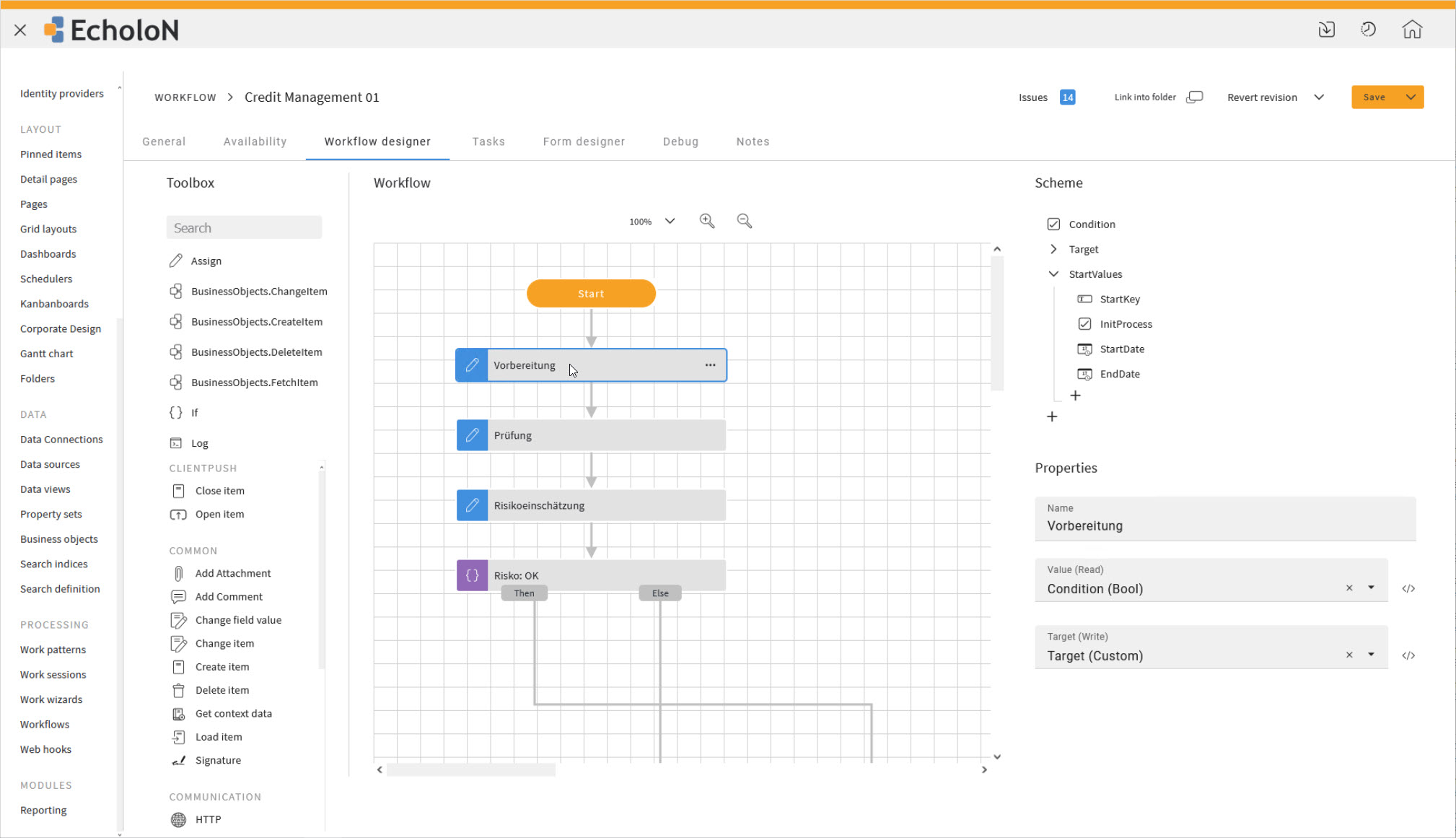
Features of the EcholoN Workflow Designer











Integrating Systems and Data Sources into Workflows
Process automation does not end at the boundaries of a single application. Many business processes require data from ERP, CRM, HR, monitoring, or other line-of-business systems.
The EcholoN Workflow Engine can integrate external systems into the process and, for example:
- import master data
- validate information
- supplement data records
- transmit status changes
- call external functions
- provide documents
- and initiate additional processes
For more extensive data integrations and system integrations, the EcholoN Data Workflow System can be used. Depending on the specific project, databases, files, directory services, web services, monitoring systems, and other data sources, among others, can be connected.
For SAP processes, the EcholoN SAP Connector is also available.
Case Study: Bünting - Automating Service and Information Processes
At the Bünting Group, EcholoN manages complex service and information processes across the entire group. A concrete example is the exchange or transfer of technical equipment between branches.
Based on a recorded transaction, EcholoN checks the stored data and, using defined categories, determines whether a device should be repaired, replaced, or decommissioned.
Verification steps, approvals, and tasks are automatically forwarded to the responsible departments. The system then initiates the order through the purchasing department of the hardware warehouse, notifies the relevant parties, and documents the goods receipt, inventory number, and device status.
Parallel systems are updated via the Data Workflow System. In the case of a transfer between branches, EcholoN can automatically generate a delivery note, update the cost center for asset accounting, and update the status in the CMDB.
Pending tasks, returns, and escalation levels remain traceable throughout the entire process.
“If we want to integrate a new system or adapt a process today, we can map it out graphically in the DWS - without any additional development or programming.”
Andree Schönfeld, Bünting Group
This is how EcholoN links approvals, data flows, and follow-up actions into a seamless workflow.
Typical Applications of the Workflow Engine
The EcholoN Workflow Engine can be used across various departments and for a range of process requirements.
Service Management and ITSM
Service requests, incidents, changes, and other ITSM processes can be managed based on defined rules. Tasks, approvals, escalations, and system actions are seamlessly integrated.
Self-Service Processes
Through a self-service portal, employees, customers, or partners can submit requests, orders, and reports in a structured manner.
The associated workflow then handles verification, distribution, and further processing.
Approval and Authorization Processes
Multi-level approvals can be controlled based on amounts, responsibilities, organizational units, or other criteria.
Possible use cases include:
- procurement requests
- investment approvals
- invoice reviews
- access permissions
- contract approvals
- and document approvals
Employee Onboarding
When new employees join the company, various departments and tasks must be coordinated.
The workflow engine can, for example, integrate Human Resources, IT, supervisors, and facilities management into a single, coordinated process. Tasks such as user account creation, hardware provisioning, access assignment, and organizational orientation are managed in a structured manner.
Quality Management
Inspections, nonconformities, corrective actions, and approvals can be implemented as structured workflows.
Information, responsibilities, deadlines, and supporting documentation remain linked to the respective process.
Maintenance and Repair
Maintenance orders, trouble tickets, inspections, and follow-up actions can be managed based on responsibilities, priorities, and deadlines.
Field and service staff can integrate mobile processing steps directly into the process.
Claims and Complaint Management
Claims and complaints can be recorded, classified, and forwarded to the responsible departments in a structured manner.
Depending on the type, priority, or impact, different processing and escalation paths can be triggered.
Cross-System Data Processing
The workflow engine can transfer information between different applications and derive automated process steps from it.
This also allows for the digitization of workflows that do not take place exclusively within a single software application.
Workflow Engine as Part of the EcholoN Platform
A workflow engine executes defined tasks, rules, events, deadlines, and system actions. Workflow management software complements this technical execution with functions for modeling, administration, monitoring, and controlled further development.
EcholoN integrates both areas within a single central platform. Workflows are not managed in isolation as flowcharts, but are directly linked to processes, data, forms, users, and business applications.
This enables a shared process logic across different EcholoN areas, such as:
- Service Management
- Ticket System
- Self-Service Portal
- knowledge base
- quality management
- customer service
- field service
- maintenance and repair
- as well as reporting and analysis
Instead of mapping processes in separate, standalone solutions, a unified environment is created for data capture, processing, automation, and analysis.
Fundamentals article “What Is a Workflow Engine?”
For which companies is the EcholoN Workflow Engine suitable?
The Workflow Engine is suitable for organizations that want to digitally map recurring or complex processes in a structured way.
It is particularly relevant when:
- multiple departments are involved in a process
- responsibilities need to be determined automatically
- information from different systems is required
- deadlines and escalations must be met
- decisions need to be documented in a traceable manner
- processes are regularly adjusted
- manual data transfers need to be reduced
- or standardized and flexible processing must be combined
The size of the company is less important than the complexity of the involved processes, responsibilities, and system integrations.
Implementation, Customization, and Operation
Graphical Configuration Instead of Rigid Standard Processes
Many process steps, forms, rules, and tasks can be configured using the web-based designer and the existing action library.
For complex integrations or project-specific functions, additional technical implementation may be required. The effort involved depends on the process and the existing system landscape.
Development, Test, and Production Environments
Workflows can be developed, tested, and then deployed to production in a controlled manner in separate environments.
Import, export, versioning, and release features support a traceable implementation and further development.
Flexible Operating Models
Depending on the selected operating model, EcholoN can be operated on-premises, as a cloud or SaaS solution, or as part of a managed service, among other options.
The appropriate model depends on the company’s technical, organizational, and data protection requirements.
Roles and Permissions
Tasks, forms, and process actions can be made available based on roles and responsibilities.
This gives users targeted access to the information and functions they need for each process step.
Integration into the Existing System Landscape
The specific integration of external applications depends on the available interfaces, data formats, and business requirements.
Before implementation, we assess which systems provide data, which actions should be automated, and which system remains the primary source for the respective information.
Frequently Asked Questions About the EcholoN Workflow Engine
What is the EcholoN Workflow Engine?
The EcholoN Workflow Engine is a component of the EcholoN platform designed for modeling, automating, and controlling digital business processes. It links tasks, users, roles, forms, rules, and system actions to create traceable workflows.
Which processes can be automated?
With EcholoN, you can automate service processes, approvals, onboarding procedures, maintenance processes, quality checks, complaints, and cross-system routine tasks, among other things.
The prerequisite is that the triggers, information, responsibilities, and desired outcomes of the process can be sufficiently defined.
Are programming skills required to create workflows?
Many workflows can be configured using the graphical designer, forms, rules, and reusable actions.
Additional implementation work may be necessary for complex system integrations, custom functions, or specific technical requirements.
Can users be integrated into workflows?
Yes. Tasks can be assigned to individual users, teams, groups, roles, or organizational units.
Forms, follow-up questions, decisions, and approvals can be integrated directly into individual process steps.
Does EcholoN support multi-level approvals?
Yes. Approval flows can be controlled based on amounts, categories, locations, organizational units, roles, or other process information.
This also allows for the mapping of different approval levels and alternative processing paths.
Can external systems be integrated?
External applications and data sources can be integrated via interfaces and connectors.
The specific implementation depends on the target system, the available interfaces, the required data, and the respective project scenario.
How are workflows monitored?
Workflow monitoring allows you to track active and completed process executions.
Process owners receive an overview of processing statuses, open tasks, runtimes, delays, and potential errors.
Can existing workflows be modified?
Workflows can be versioned and further developed in a controlled manner. New versions can be reviewed and approved before being deployed in production.
Processes that have already been started remain traceable.
What operating models are available?
Depending on the selected plan, EcholoN can be operated on-premises, as a cloud or SaaS solution, or as part of a managed service.
Is the Workflow Engine a standalone product?
The Workflow Engine is part of the EcholoN platform. The available feature set depends on the edition used and the individual system configuration.
You can find “EcholoN Workflow Engine” in these packages
ExpressAvailable as the basis for the workflows included in this edition's feature set
| StandardAvailable as the basis for the workflows included in this edition's feature set
|
ProfessionalCan be used without restriction with all workflow variants
| EnterpriseCan be used without restriction with all workflow variants
|
Also of interest
Self-Service Portal Software
Enable employees, customers, or partners to submit requests in a structured manner and track their processing status independently.
Enterprise Service Management Software
Manage services, processes, and responsibilities on a single, centralized platform.
Enterprise Service Management Software
Ticket System
Record, prioritize, and process requests and issues in a structured and traceable manner.
Knowledge Base
Make knowledge available directly within service and workflow processes.
Reporting Tool
Centrally analyze process statuses, turnaround times, and other key metrics.
What Is a Workflow Engine?
Learn more about the definition, functionality, and use cases of a workflow engine.
Every process has different requirements in terms of roles, forms, decisions, deadlines, and system integrations. That’s why successful process automation doesn’t start with a standard template, but with a clear analysis of your existing workflows.
Let’s work together to explore how your business processes can be digitally modeled, automated, and integrated into your existing system landscape using the EcholoN Workflow Engine.