

Problems cannot always be solved at the level at which they arise. Sometimes specialized expertise is lacking, a decision requires additional authority, or an agreed-upon deadline is about to expire. In such situations, a structured escalation management process ensures that an issue reaches the right place in a timely manner.
However, escalation does not simply mean passing a problem “up the chain.” Rather, the goal is to define clear escalation criteria, responsibilities, and actions so that critical situations can be identified early and handled in a controlled manner.
Escalation management is used in IT service management as well as in customer service, technical service, field service, and internal business processes.
In a nutshell: Escalation management refers to the structured handling of issues that cannot be resolved adequately or in a timely manner within the normal processing workflow. Defined rules determine when to escalate, who to involve, and what actions to take.
What is escalation management?
Escalation management is a structured process for handling problems, incidents, requests, or other issues when additional expertise, decision-making authority, or a faster response is required.
To this end, an organization defines:
- which events or thresholds trigger an escalation,
- which type of escalation is required,
- which escalation level is reached,
- which roles or teams are responsible,
- which response times apply,
- which actions are triggered,
- and how the handling of the issue is documented.
An escalation is therefore more than just a forwarding or reassignment. If a ticket is simply handed over to another employee, this does not automatically constitute an escalation. The key factor is that there is a defined reason for escalation, which triggers a designated escalation path or a specific action.
Furthermore, effective escalation management does not begin only after a situation has already become critical. Through deadlines, priorities, service levels, and other process information, impending problems can be identified early on.
Why is escalation management important?
Without established escalation rules, how critical incidents are handled often depends on the individual judgment of specific employees.
This raises questions such as:
- When must an incident be escalated?
- Who takes over when specialized knowledge is lacking?
- When must a manager be informed?
- What happens if an SLA deadline is at risk?
- Who is authorized to allocate additional resources?
- When does a normal disruption become a critical incident?
Without clear answers, delays, unnecessary follow-up questions, or inconsistent decisions arise.
Structured escalation management, on the other hand, establishes transparent responsibilities, defined decision-making paths, and measurable response mechanisms.
It’s important to note that not every difficult incident should be escalated. Too many escalations overload specialists and managers and weaken the effectiveness of the escalation process. Escalations that occur too late, however, increase the risk of missed deadlines, service outages, or dissatisfied customers.
“Effective escalation management does not mean passing problems on more quickly. It ensures that, at the right time, the specific expertise and decision-making authority necessary to find a solution are brought in.”
- Ralph Bockisch, Sales Consultant, mIT solutions GmbH
Escalation Management vs. Conflict Management
The term “escalation” is used in various contexts. Therefore, it is important to clearly define its scope.
In escalation management for service and business processes, escalation means that additional expertise, responsibility, or decision-making authority is brought in based on defined criteria.
This must be distinguished from conflict escalation. In that context, escalation describes the increasing intensity of an interpersonal or organizational conflict.
The well-known nine stages of escalation according to Friedrich Glasl are also part of conflict management. They describe the development of a conflict and should not be equated with the process-related escalation stages in escalation management discussed here.
In this article, therefore, “escalation” refers exclusively to the regulated management of service, support, and business processes.
What are the different types of escalation?
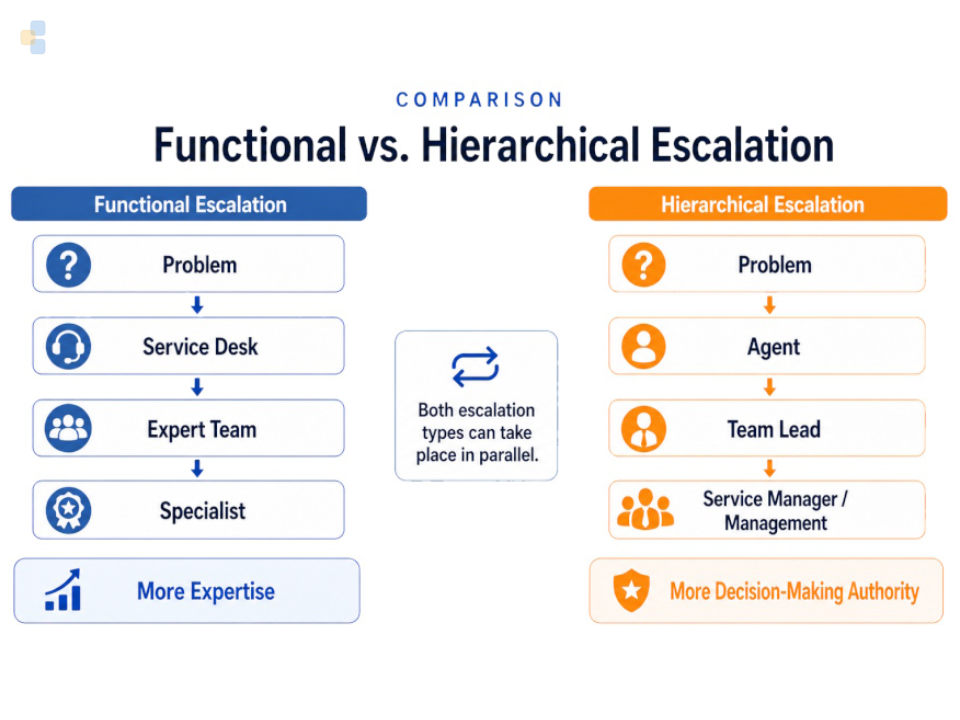
When it comes to types of escalation, the main distinction is based on what additional expertise is required.
The two basic forms are functional escalation and hierarchical escalation.
Functional Escalation
In a functional escalation, an incident is handed off to individuals or teams with more specialized knowledge.
A typical example from IT support:
The service desk cannot resolve a technical issue on its own. The incident is therefore handed over to a specialist or to second-level support.
Additional examples:
- Customer service → Product specialist
- Technical support → Development
- Field service → Specialist technician
- Maintenance → Manufacturer
- Service desk → Network or database team
Functional escalation thus primarily changes the technical responsibility.
Hierarchical Escalation
In a hierarchical escalation, a higher level of responsibility or decision-making is involved.
This may be necessary if:
- additional resources are needed,
- special approvals are required,
- there is a risk of significant financial implications,
- an important customer is affected,
- a critical service is at risk,
- or a decision falls outside the agent’s authority.
The process does not necessarily have to be handed over entirely to a manager. Often, the operational handling remains with the responsible team, while an additional decision-making level is involved.
Comparison of Functional and Hierarchical Escalation
| Characteristic | Functional Escalation | Hierarchical Escalation |
|---|---|---|
| Main Reason | Expertise or specialized skills required | Additional responsibility or decision-making authority is required |
| Objective | involve the appropriate specialized agency | involve a higher level of management |
| Typical Change | Service Desk → Specialist | Position → Team Leader / Management |
| Operational Processing | Frequent handoffs to another team | can stay with the current team |
| Example | Network issue reported to the network team | Report a critical service outage to the Service Manager |
Both forms can occur simultaneously. For example, a critical incident can be escalated functionally to specialists and, in parallel, hierarchically to the service manager.
How are escalations triggered?
The escalation type describes where the issue is escalated. This is distinct from the question of how the escalation process is triggered.
Typical trigger mechanisms include:
| Trigger | Example |
|---|---|
| Manual | An employee recognizes that additional subject matter expertise or decision-making authority is required. |
| Time-based | A process has remained unprocessed for longer than a defined period of time. |
| SLA-based | A certain percentage of the agreed-upon response or resolution time has elapsed. |
| Rule-based | A specific combination of priority, status, customer, or service triggers the escalation. |
| Event-based | A technical or organizational event changes the criticality of a process. |
An automatic escalation is therefore not a separate type of escalation. It describes the mechanism through which, for example, a functional or hierarchical escalation is triggered.
How does an escalation process work?
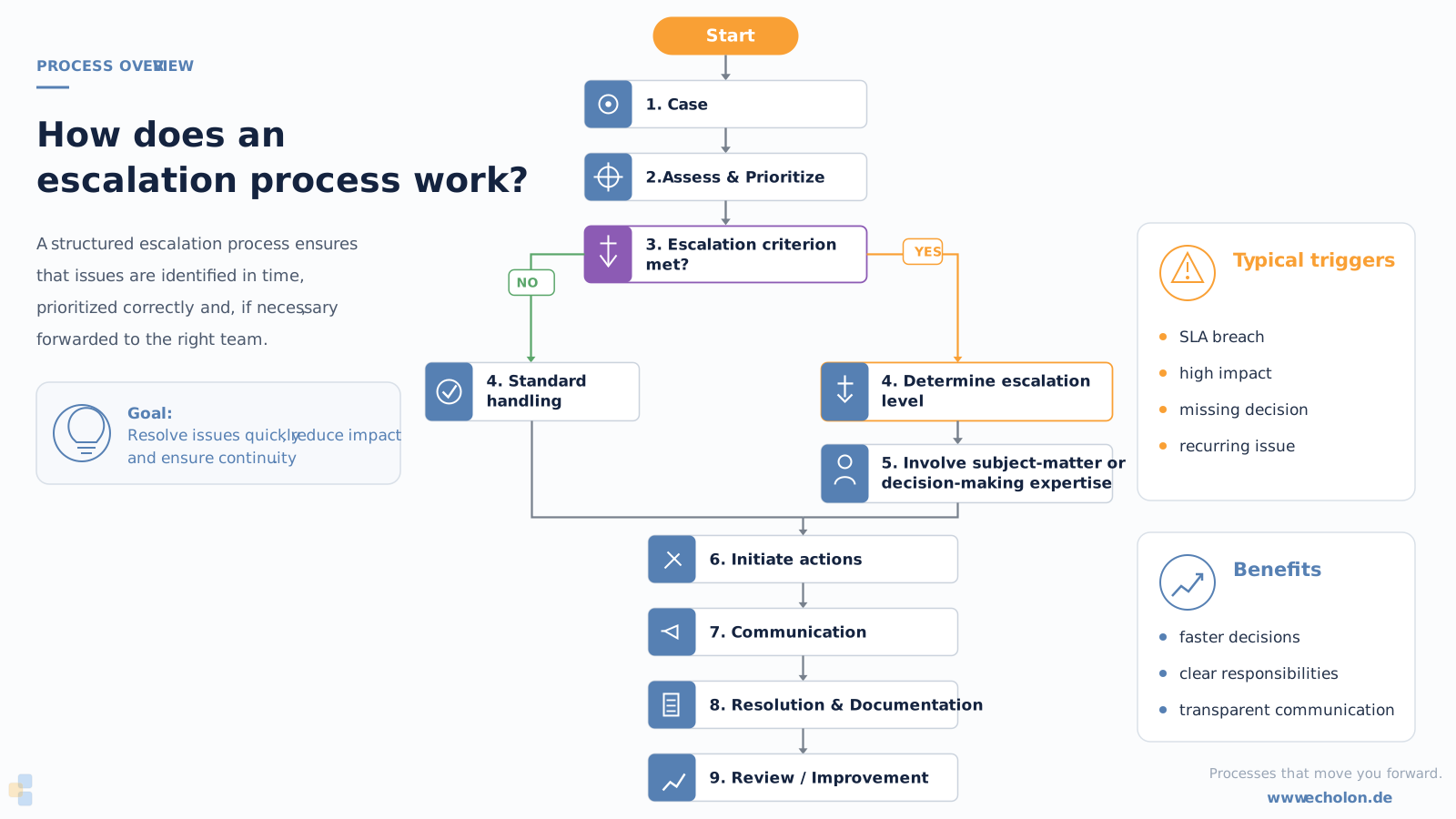
An escalation process should clearly define which trigger leads to which response.
A typical process looks like this:
-
1. Record and Assess the Incident
1It all starts, for example, with an incident, a customer complaint, a technical malfunction, an overdue task, or a quality deviation.
The information relevant for further processing should be recorded in a structured manner.
-
2. Determine Priority
2Depending on the process, factors such as impact, urgency, service criticality, customer status, or other criteria are evaluated.
In incident management, for example, impact and urgency can be used to determine priority.
The specific relationship between incidents, priority, and escalation is discussed in more detail in the article on the incident escalation process.
-
3. Check escalation criteria
3Next, a check is performed to determine whether a defined escalation trigger has occurred.
-
4. Determine escalation level and responsibility
4Depending on the criticality, the role or organizational level to be involved is determined.
-
5. Initiate Actions
5An escalation should trigger specific actions, such as:
- Bringing in specialists,
- Reassigning tasks,
- Informing additional personnel,
- Increasing the priority,
- Notifying team leaders or management,
- Actively informing customers,
- Involving external service providers,
- or initiating a follow-up process.
-
6. Document and close the escalation
6Upon completion, it should remain clear why the issue was escalated, what actions were taken, and how the issue was resolved.
This data later serves as an important basis for reporting and continuous improvement.
What are appropriate escalation criteria?
Escalation criteria determine when a case leaves the normal processing workflow.
They should be as specific and measurable as possible.
Typical escalation criteria include:
- agreed-upon processing time nearly reached or exceeded,
- SLA response or resolution time at risk,
- high or critical priority,
- business-critical service affected,
- required expertise not available,
- multiple unsuccessful attempts to resolve the issue,
- case left unprocessed for a defined period of time,
- special customer or contract status,
- significant financial loss,
- security or compliance risk,
- required decision outside one’s own authority.
In contrast, vague rules such as “notify the team lead in case of major problems” are difficult to manage and can hardly be automated.
Clearly evaluable conditions are preferable:
Priority = critical
AND Ticket has not been assigned for 15 minutes
→ Notify team lead and trigger escalation level 1.
The more clearly the criteria are defined, the more reliably they can be automated later.
Defining Escalation Levels in Escalation Management
Escalation levels describe the increasing intensity of actions within a service or business process.
It is important to distinguish between normal handling and actual escalation..
| Status / Level | Typical trigger | Responsibility | Action |
|---|---|---|---|
| Initial State / Level 0 | Regular process | responsible service team | normal handling |
| Escalation Level 1 | Additional expertise required | specialist / subject matter team | functional escalation |
| Escalation Level 2 | SLA at risk, high impact, or need for a decision | team lead / service manager | additional resources, prioritization, or hierarchical escalation |
| Escalation Level 3 | Business-critical impact | Management / crisis response team | Prioritized management and special communication |
The number and naming of escalation levels are not universally prescribed. What is crucial is that, for each level, at least triggers, responsibility, response time, and actions are defined.
What is an escalation path?
The escalation path describes the possible route a ticket takes through various roles or levels of responsibility.
An example:
Service Desk → Subject Matter Expert Team → Team Leader → Service Manager → Management
However, this does not mean that every ticket must go through every level.
In the case of a business-critical incident, for example, a direct escalation to a higher level may be advisable or necessary.
A good escalation path therefore takes into account not only an organizational hierarchy but also priority, impact, time, service criticality, and the need for a decision.
Roles and Responsibilities in Escalation Management
Escalation management requires not only defined rules but also clear organizational accountability.
Depending on the company, this responsibility may fall to an escalation manager, service manager, process owner, or a comparable role.
Typical tasks include:
- Defining escalation rules and criteria,
- Maintaining the escalation matrix and responsibilities,
- Coordinating escalation paths with the teams involved,
- Coordinating critical escalations,
- Analyzing recurring causes of escalations,
- Monitoring key performance indicators,
- and Deriving improvement measures.
In the operational process, it should also be clear who is authorized to trigger an escalation, who must take it over, and who decides on further actions.
This governance is particularly important for automated processes: A workflow can reliably execute rules, but it does not replace the organizational definition of those rules.
Escalation Management and SLA
There is a particularly close connection between escalation management and service level management.
For example, a service level agreement defines response or resolution times. Escalation rules then determine what happens when compliance with these agreements is at risk.
The goal should not be to react only after an SLA violation has occurred.
A tiered approach makes more sense.
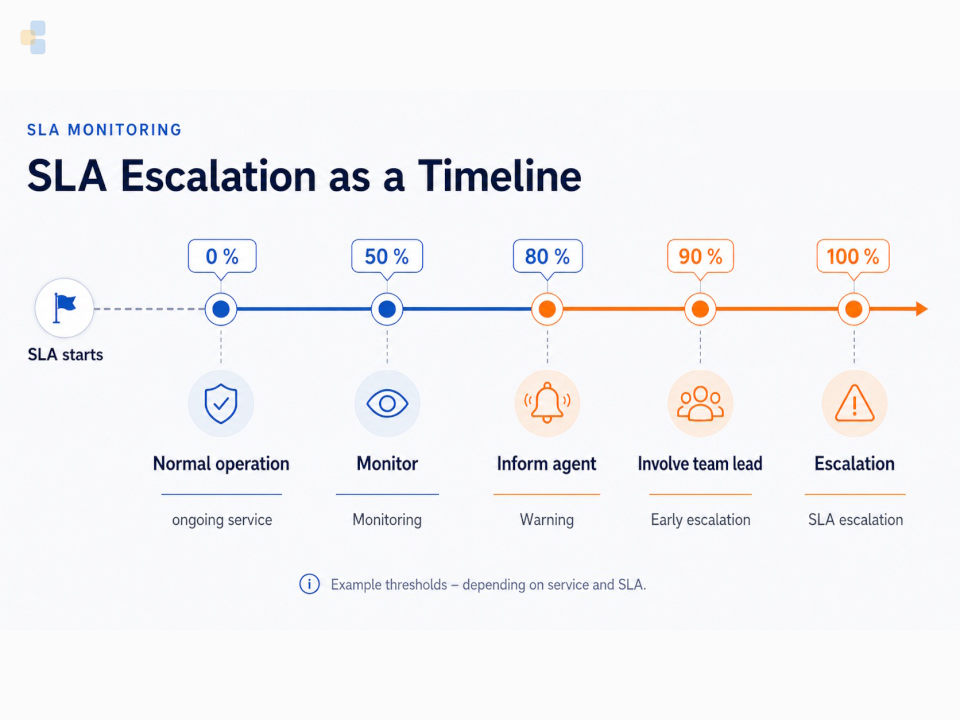
Example escalation logic—the specific thresholds must be defined individually for each service and SLA:
| SLA time used | Example action |
|---|---|
| 50 % | Continue monitoring status |
| 80 % | Notify the agent |
| 90 % | Involve team lead or additional resources |
| 100 % | Trigger defined SLA escalation |
This transforms simple deadline monitoring into a proactive escalation process.
Particularly important: Not every SLA requires the same thresholds. A business-critical service may require escalations much earlier than a standard service request.
Escalation Management in IT Service Management
In IT Service Management, escalation management is linked to several service processes.
In Incident Management, a functional escalation may be necessary if the Service Desk cannot resolve an incident on its own. In cases of particularly significant impact, hierarchical escalations or a major incident procedure may also be required.
The article What Does the Incident Escalation Process Look Like? explains more about the incident-specific logic involving impact, urgency, prioritization, and escalation.
In Problem Management, escalations may be necessary if additional specialists, resources, or decisions are required for root cause analysis.
Service Level Management provides important time-based escalation criteria through agreed-upon response and resolution times.
The Service Desk often serves as the central operational interface. It is where requests, incidents, responsibilities, priorities, and service levels converge—and thus much of the information needed for escalation decisions.
Automating Escalation Management
As the number of cases increases, purely manual escalation management quickly becomes time-consuming.
Employees would have to continuously check:
- Which deadlines are about to expire?
- Which tickets have not yet been assigned?
- Where has the priority changed?
- Which customers have special agreements?
- Which tasks are awaiting approval?
- Which cases exceed defined thresholds?
Rule-based processes can automate this monitoring.
Example of an automatic escalation rule
Suppose a critical service has a defined response time.
The rule could be:
Priority = critical
AND
Ticket not yet assigned to an agent
AND
80% of the available response time has elapsed
→ Notify the agent
→ Inform the team leader
→ Prioritize the process
If the defined response time is subsequently exceeded:
→ Increase the escalation level
→ Notify the service manager
→ Involve an additional group of agents
The automation does not affect the type of escalation itself, but rather its triggering and subsequent actions.
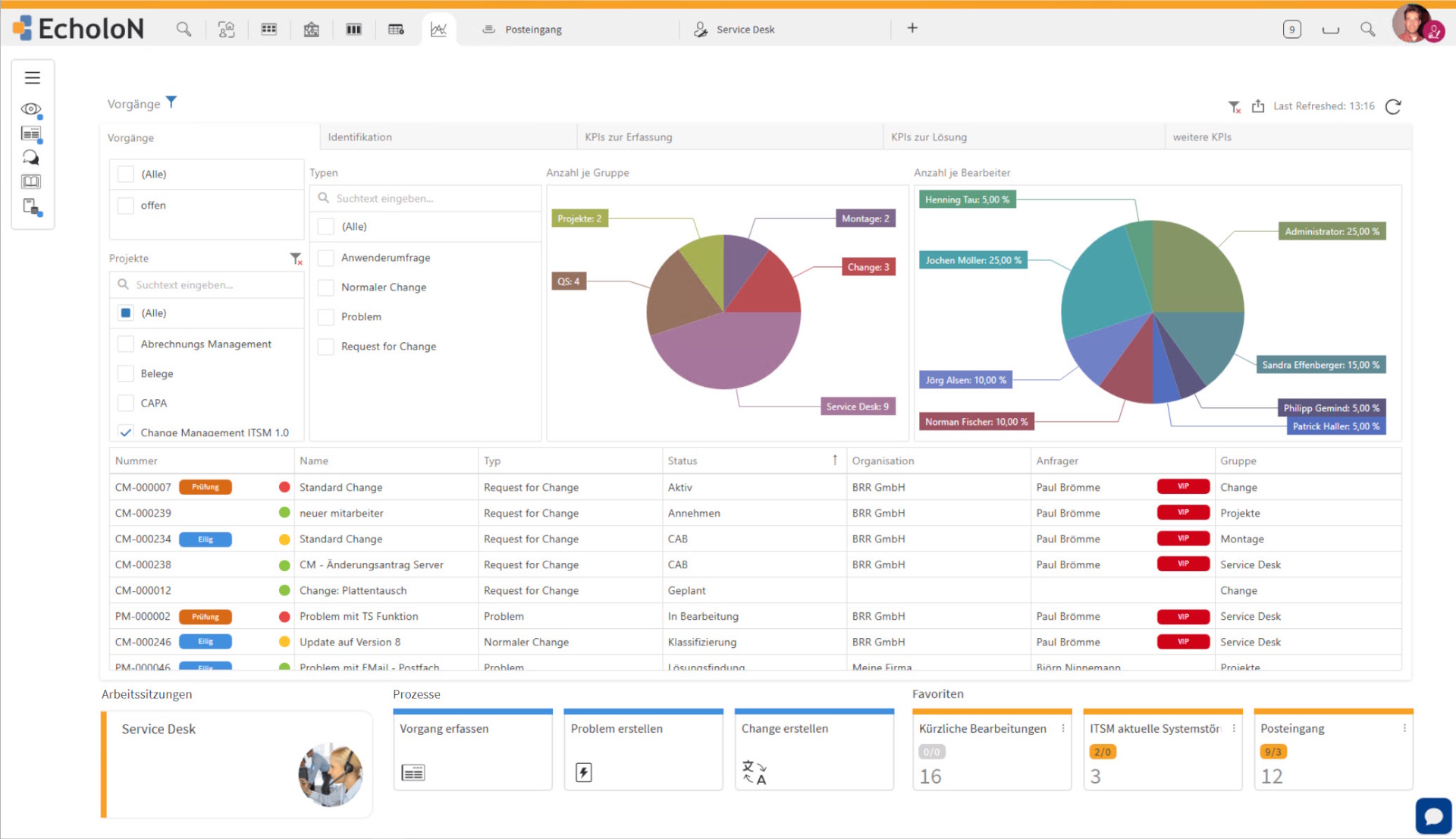
In EcholoN, such rules can, for example, be composed of priority, service, status, deadlines, or other ticket information and linked to workflow actions.
Escalation as Part of a Workflow
The real added value arises when an escalation not only sends a message but also triggers a defined follow-up process.
With a workflow engine, conditions can, for example, be linked to:
- tasks,
- responsibilities
- priorities
- deadlines
- notifications
- status changes
- approvals
- reassignments
- and follow-up processes
As a result, escalation management evolves from manual follow-up to a controllable component of the entire business or service process.
Escalation Management Outside of IT
The basic logic of escalation management is not limited to IT processes.
It can be applied anywhere where deadlines, responsibilities, risks, or quality requirements are monitored.
| Area Typical | Escalation Case |
|---|---|
| Customer Service | A complaint reaches a contractual, jurisdictional, or decision-making boundary |
Technical Support | Specialized knowledge or manufacturer support is required |
| Field Service | Equipment criticality or SLA requires prioritized response |
| Quality Management | A defined threshold or critical deviation has been reached |
| Internal Services | A task, approval, or release exceeds a specified deadline |
This means the same escalation logic can be applied, for example, in customer service, technical field service, facility management, HR, or procurement processes.
How can escalation management be measured?
Escalation management should not only function effectively on an operational level but also be evaluated regularly.
Suitable metrics include, for example:
| Metric | Description |
|---|---|
| Escalation rate | How many cases are escalated relative to the total volume? |
| Time to Escalation | How quickly are critical situations identified? |
| Handling Time After Escalation | How effective is the escalation process? |
| SLA Violations Despite Escalation | Are escalation rules triggered early enough? |
| Escalations by Cause | Which problems lead to escalations particularly frequently? |
| Escalations by Service / Team | Where do structural bottlenecks occur? |
| Repeated escalations | Which root causes have not yet been permanently resolved? |
A high escalation rate is not necessarily a bad thing. It may, for example, be due to particularly critical services or intentionally strict rules.
It becomes particularly noteworthy when certain processes, teams, or root causes are consistently escalated at a disproportionately high rate.
This makes escalation management a source of data for both reporting and continuous process improvement.
Common Mistakes and Best Practices in Escalation Management
Many problems in escalation management arise not from a lack of escalations, but from unclear rules.
Escalating too late: Warning thresholds should be defined in such a way that action can be taken before a deadline is missed.
Escalating too frequently: If nearly every issue triggers an escalation, escalation levels lose their significance. Rules must distinguish between routine and exceptional handling.
Unclear responsibilities: For each escalation level, it should be clearly defined which role is responsible for responding.
Subjective criteria: Phrases such as “in the event of major problems” should be replaced with measurable thresholds.
Escalation via email only: Email can be used to provide information, but it should not replace the actual escalation procedure. Status, responsibility, and history must remain traceable within the process.
Treat SLAs and escalation separately: Service levels provide important time-based escalation criteria and should therefore be directly linked to the escalation process.
Failure to maintain the escalation matrix: Roles, services, and contracts change. Escalation paths must be updated accordingly.
Lack of analysis: Recurring escalations can indicate a lack of resources, unrealistic SLAs, process issues, or unclear responsibilities.
An effective practice therefore follows several principles:
- clear and measurable escalation criteria
- well-defined roles
- timely warning thresholds
- complete handover of relevant information
- separation between functional and hierarchical escalation
- meaningful automation
- regular evaluation
- and continuous maintenance of escalation rules
Example of an Escalation Process
A service company maintains a business-critical technical system for a customer.
A malfunction is reported via the service desk.
- Logging: The incident is logged with details on the customer, system, malfunction description, and service contract.
- Assessment: Based on its impact, the malfunction is assigned a high priority.
- Normal Handling: A service representative takes over the incident.
- Functional escalation: The cause cannot be determined immediately. A specialist is consulted.
- Time-based trigger: A defined portion of the agreed-upon response time has elapsed. The team leader automatically receives an alert.
- Hierarchical escalation: Further delay jeopardizes the SLA. The service manager is brought in and allocates additional resources.
- Solution: The cause is resolved and service is restored.
- Documentation and Analysis: The reasons for escalation, actions taken, and handling times remain associated with the case and can be analyzed later.
This example shows that escalation management is not a single step. It combines prioritization, criteria, deadlines, responsibilities, communication, and process control.
Escalation Management with EcholoN
Escalation management is particularly effective when service cases, responsibilities, deadlines, and process rules are not scattered across different systems, spreadsheets, and emails.
With EcholoN, escalations can be integrated into end-to-end service and business processes.
Depending on the defined conditions, the system can, for example:
- deadlines be monitored,
- priorities be taken into account,
- reminders be triggered,
- tasks be automatically assigned,
- additional agents be notified,
- escalation levels be activated,
- cases be reassigned,
- and downstream workflows be initiated.
The EcholoN Workflow Engine serves as the central bridge between escalation rules and process automation. As a result, escalations do not have to be limited to a notification but can trigger further process steps.
In the EcholoN Service Desk, these mechanisms can also be linked to service tickets, responsibilities, and service levels.
The underlying process logic is not limited to ITSM. It can also be used for customer service, technical support, field service, and internal business processes.
Conclusion: Escalation is a controlled process - not a stopgap measure
Professional escalation management does not begin only when a problem gets out of control.
Clear escalation criteria, defined responsibilities, and tiered escalation paths ensure that an issue receives the necessary subject matter or decision-making authority at the right time.
Functional and hierarchical escalations describe the direction of the escalation. Manual, time-based, SLA-based, event-based, or rule-based mechanisms determine how it is triggered.
Escalation management becomes particularly effective when priorities, deadlines, and process statuses are automatically monitored, and an escalation can immediately trigger further workflows.
This transforms the reactive forwarding of a problem into a controlled component of professional service and business processes.
Frequently Asked Questions About Escalation Management
What is escalation management?
Escalation management refers to the structured handling of issues that cannot be resolved adequately or in a timely manner within the normal workflow. Defined rules determine triggers, responsibilities, and actions.
What types of escalation are there?
A basic distinction is made between functional and hierarchical escalation. Functional escalation involves additional subject matter expertise, while hierarchical escalation involves additional levels of decision-making or responsibility.
What is an automatic escalation?
An automatic escalation is triggered by predefined conditions, such as an SLA deadline at risk, a specific status, or a critical priority. “Automatic” here describes the method of triggering and not a specific escalation path.
What are escalation levels?
Escalation levels define different intensities within an escalation process. They specify which roles are involved as criticality increases and which actions are triggered. They should not be confused with Glasl’s escalation levels from conflict management.
What should an escalation matrix include?
An escalation matrix contains, at a minimum, escalation criteria, the escalation level, the responsible role or person, the response time, and the intended actions.
What is an escalation path?
An escalation path describes the possible route an incident takes through functional and organizational levels. Depending on the criticality and the situation, individual levels may be skipped.
How are SLAs and escalation management related?
SLAs define, for example, response and resolution times. Escalation rules specify which actions are taken if compliance with these times is at risk or a deadline is exceeded.
How does escalation management work in ITSM?
In IT Service Management, escalations are used, for example, for incidents, problems, and service requests. They can be triggered functionally to specialists, hierarchically to managers, or automatically based on deadlines and process rules.
How can escalation management be automated?
Workflow and service management systems can monitor priorities, processing statuses, deadlines, and other process information. When defined conditions are met, notifications, reassignments, escalation levels, or additional workflows can be triggered automatically.