With the EcholoN Helpdesk Software, you can capture, coordinate, and process internal and external support requests through a central platform. Tickets, communications, responsibilities, deadlines, and solution knowledge remain traceably linked from the moment a request is received until a documented solution is reached.
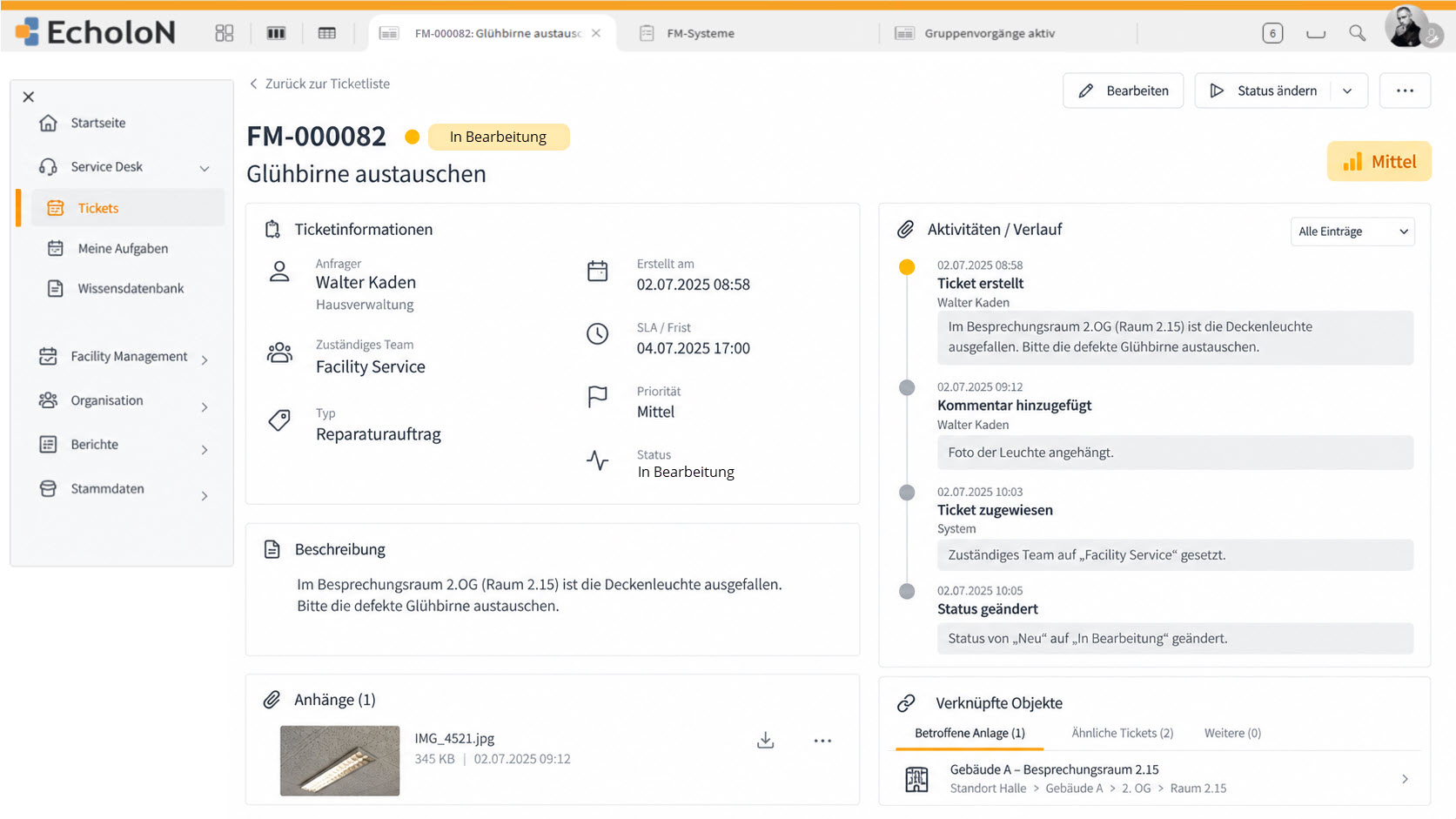
EcholoN combines proven help desk features with configurable forms, roles, data structures, and workflows. This allows a help desk to later evolve into a service desk, an ITSM solution, or a custom business application - all on the same technical platform.
400+ customers · Average 15.7 years in use · Made in Germany




Launch the help desk. Keep the platform.
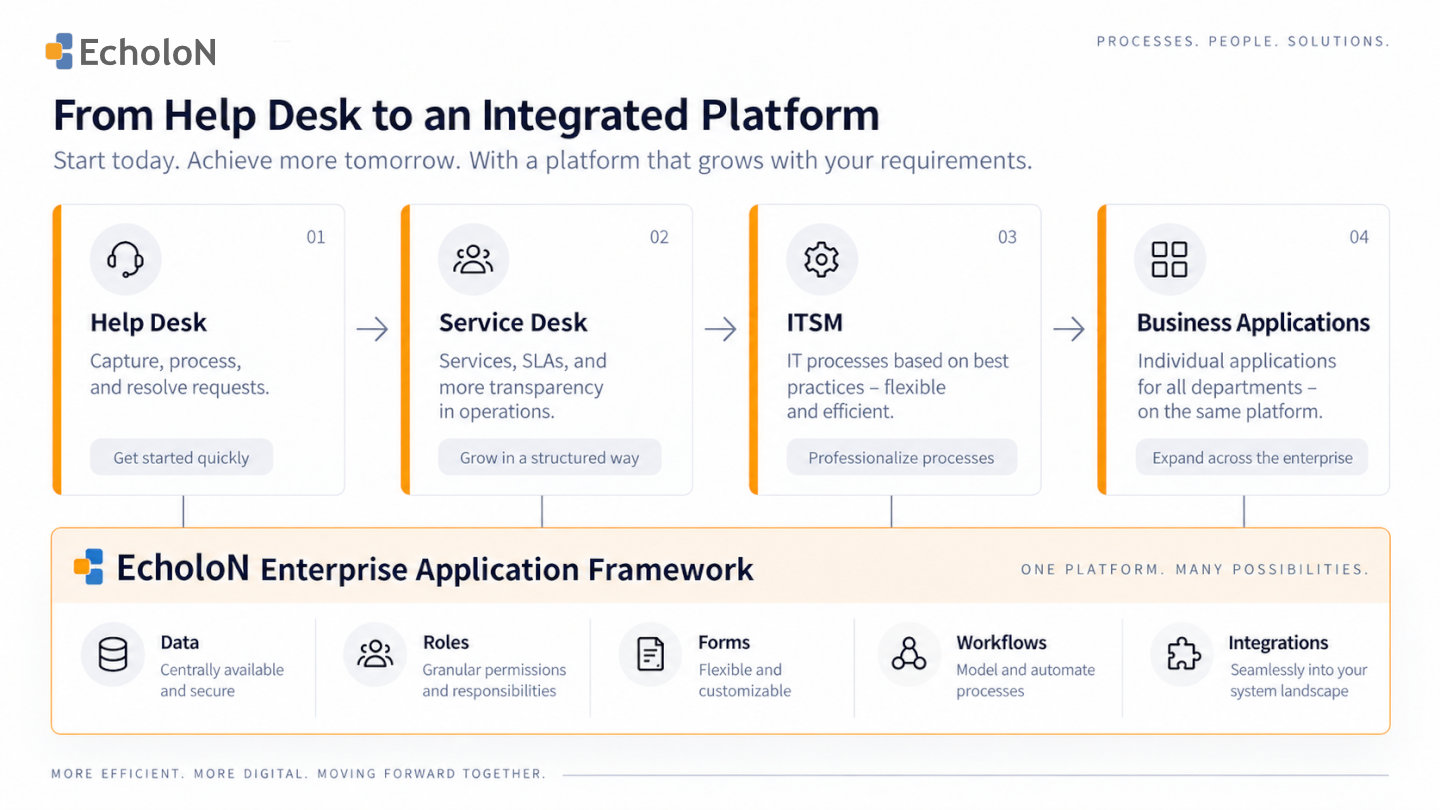
Many companies start with a clear requirement: Support requests should be centrally logged, quickly forwarded to the right department, and reliably processed.
As usage increases, requirements often grow. Additional support teams are added, self-service needs to be integrated, processes vary by customer or organization, data from other applications is required, or an operational help desk gives rise to more advanced service management processes.
EcholoN therefore combines standardized help desk functions with a configurable software platform.
Get started with existing features
Ticket processing, knowledge management, responsibilities, escalations, self-service, workflows, and analytics form a solid foundation for operational support.
This means companies do not have to develop every help desk application from scratch.
Adapt to Your Own Organization
Support organizations differ in terms of categories, roles, forms, responsibilities, deadlines, and processing routes.
EcholoN makes it possible to map these structures within the platform and—depending on the edition and requirements—to configure them further.
Develop step by step
As requirements grow, additional service processes, data structures, or specialized applications can be added on the same technical foundation.
Existing data, users, roles, integrations, and workflow functions can be reused in the process.
Start with a standardized setup. Configure it individually. Expand step by step.
How the Help Desk Works with EcholoN
A structured help desk process consolidates support requests from various intake channels into a traceable workflow.
-
1. Enter a Request
Inquiries received via email, chat, phone, self-service, or integrated systems can be consolidated into centralized cases.
Configurable forms help ensure that the information required for each support case is collected in a structured manner.
-
2. Categorize and Prioritize
Inquiries can be categorized and prioritized based on defined criteria.
Depending on the process, factors such as the type of inquiry, impact, urgency, customer, organization, or other case details can be taken into account.
This allows critical support cases to be handled differently from general questions or less time-sensitive inquiries.
-
3. Determine responsibility
Tickets are forwarded to the designated teams or agents.
Assignments can be controlled based on roles, organizational units, categories, customers, locations, or other available information.
The previous processing history is retained even when a ticket is transferred.
-
4. Support Editing
Support staff can access existing information, previous cases, and knowledge base content while handling a case.
Tasks, notifications, and defined process steps facilitate coordinated case handling.
This ensures transparency regarding which steps have already been completed and which tasks are still pending.
-
5. Manage Deadlines and Escalations
Response, processing, and resolution times can be taken into account according to the respective support process.
Notifications or escalations can be triggered for defined events, and additional personnel can be involved.
This ensures that at-risk or overdue tasks remain visible.
-
6. Document and evaluate the solution
Communication, activities, solutions, and other processing information are documented in a traceable manner within the case.
Once the case is closed, the recorded data is available for reports, dashboards, quality analyses, and the further development of support services.
Key Features of the EcholoN Help Desk Software
Ticketing and Inbound Channels
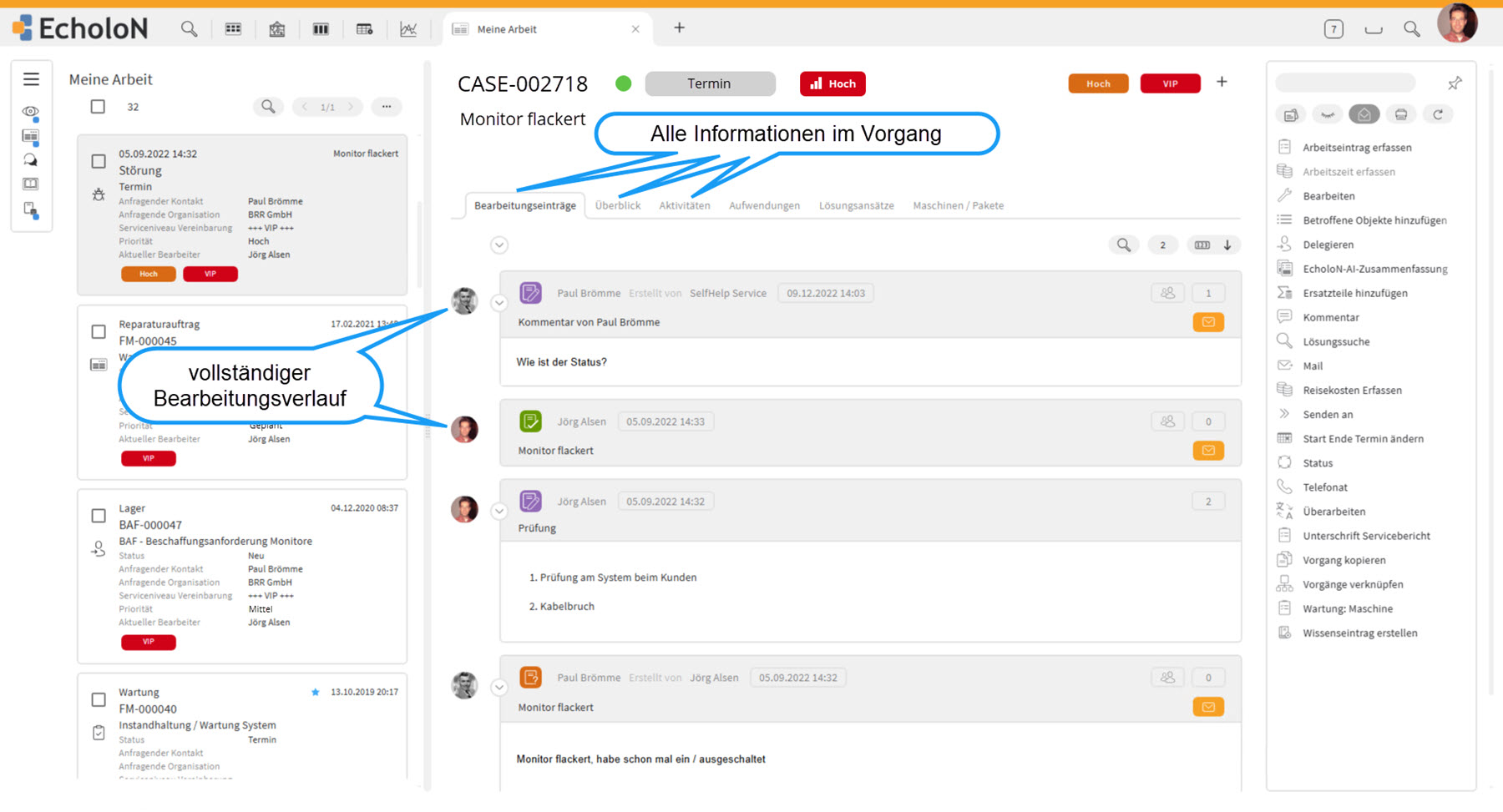
Support requests from different channels can be consolidated into a single ticket or case.
Depending on the specific scenario, these may include, for example, emails, phone calls, self-service, and connected applications.
The case consolidates all information relevant to handling the request, such as:
- Requester and organization
- Category and priority
- Status and responsibility
- Communication history
- Tasks and activities
- Deadlines and escalations
- Attachments and documents
- Related cases
- Existing solution information
This ensures that the processing status remains traceable even when the case is transferred between different employees or teams.
Assignment, Prioritization, and Escalation
Not every support request requires the same handling process.
Rules and process information can be used to categorize and prioritize tickets and assign them to the appropriate employees or groups.
Deadlines and escalation paths also help keep track of time-sensitive cases.
Knowledge Base and Self-Service
Pre-documented solutions, instructions, and other knowledge content can be accessed directly while processing a ticket.
Approved content can also be made available via the self-service portal.
Depending on the specific scenario, users or customers can, among other things:
- Submit support requests
- Use guided forms
- View existing cases
- Track processing statuses
- Answer follow-up questions
- Use the provided knowledge content
This enables support staff to reuse existing knowledge and allows users to resolve certain issues on their own.
Workflows and Process Automation
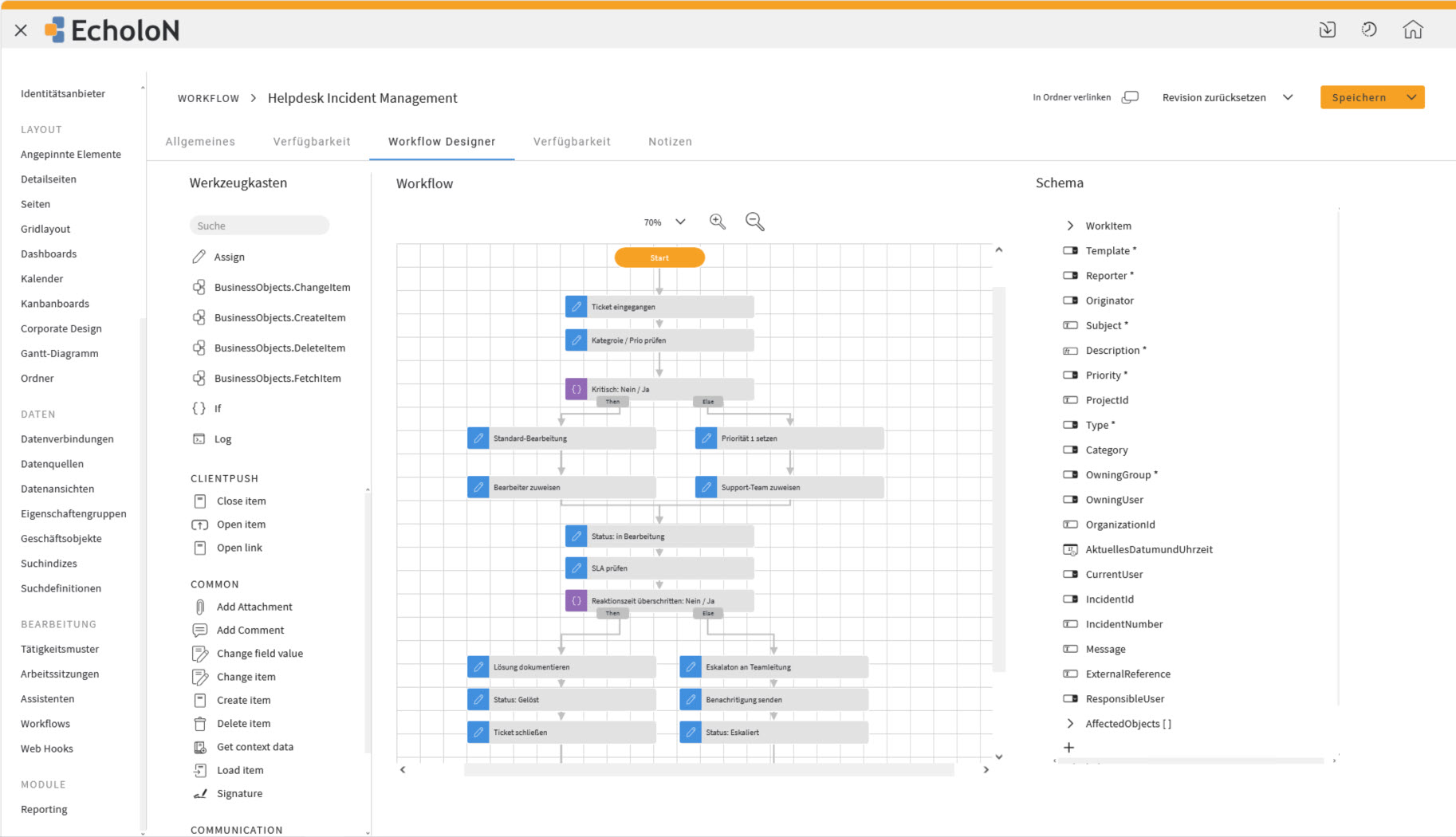
Recurring tasks do not have to be performed entirely manually.
Depending on the process, the EcholoN Workflow Engine allows you, for example, to:
- Create and assign tasks
- Check conditions
- Send notifications
- Calculate deadlines
- Trigger escalations
- Update statuses
- Initiate additional process steps
Forms, roles, data, and process logic can be linked together.
Data and Integrations
A help desk often requires information from existing enterprise applications.
Depending on the use case, for example, ERP and CRM systems, SAP, monitoring solutions, and other line-of-business systems and data sources can be connected to EcholoN.
APIs, interfaces, web services, and connectors make it possible to incorporate existing information into support processes without having to replace existing systems.
This ensures that necessary customer, organizational, product, system, or other process information is available exactly where it’s needed for processing.
Data and Integrations with EcholoN
Reporting and Dashboards
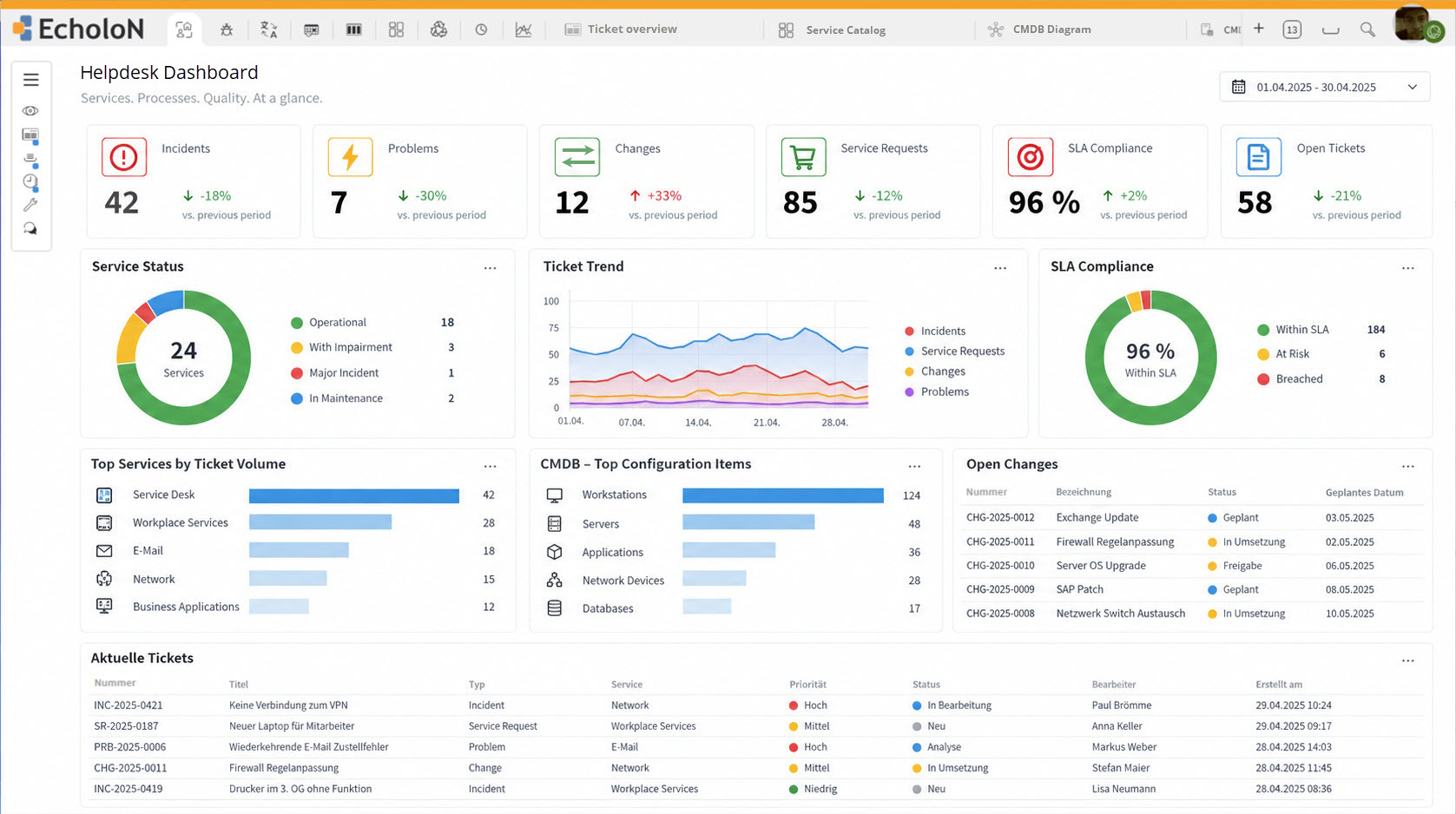
Structured processing creates a common database for the operational management and further development of support.
Possible metrics include, for example:
- open cases
- ticket volume
- categories and priorities
- processing statuses
- response and resolution times
- at-risk or escalated cases
- distribution across teams or agents
- recurring support issues
The specific metrics used depend on the goals and processes of the respective support organization.
Helpdesk für interne IT und externen Kundensupport
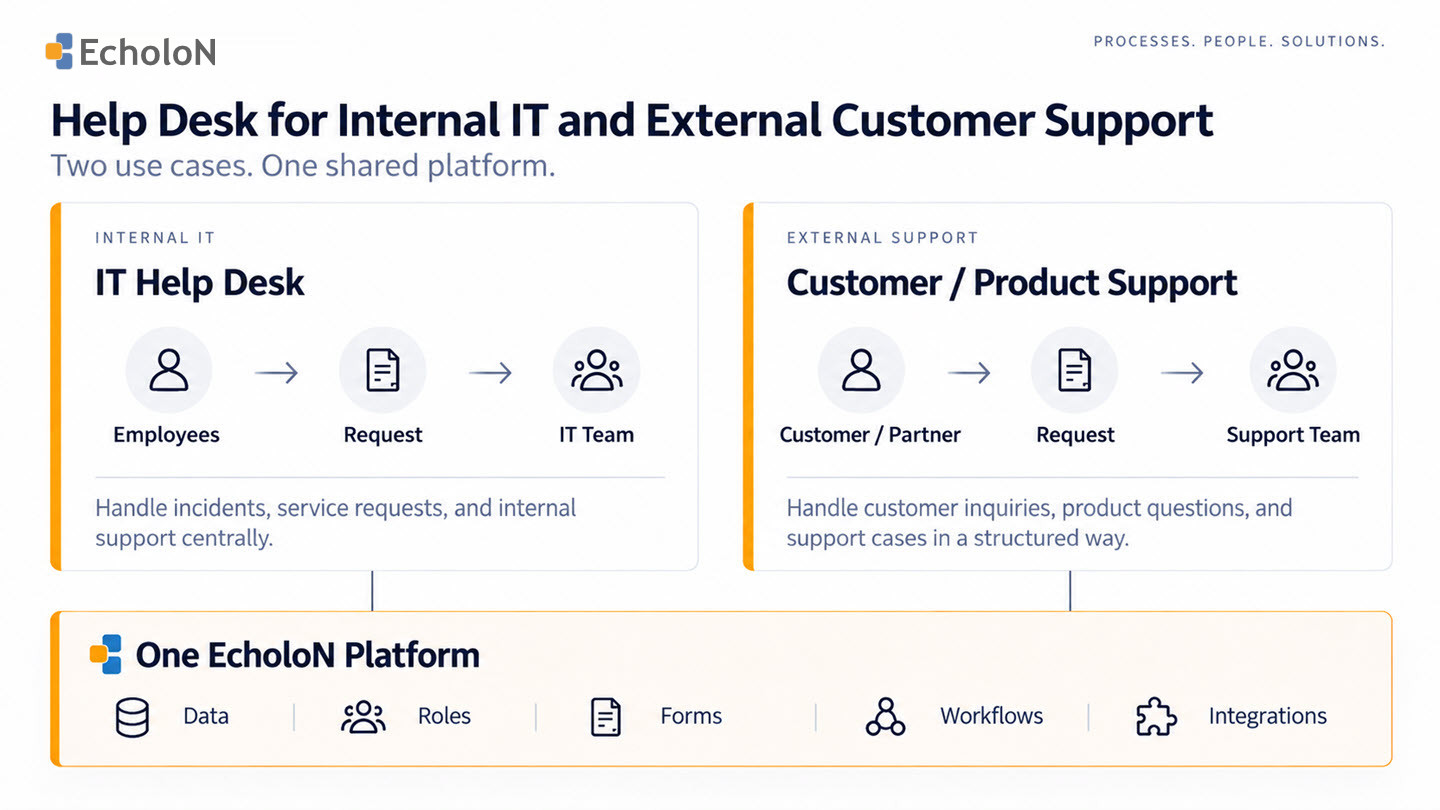
EcholoN can map different support organizations onto a single platform.
IT Help Desk and Internal User Support
Employees report technical issues, questions about applications, workstations, or other IT-related topics.
Through a central IT Help Desk, these requests are systematically recorded, categorized, and forwarded to the appropriate support teams.
Existing information about users, systems, or other technical objects can provide agents with additional context.
If requirements extend beyond operational support handling, advanced service management and ITSM processes can be integrated onto the same platform.
EcholoN IT Service Management Software
Technical Customer and Product Support
External customer inquiries can also be recorded and processed in a structured manner with EcholoN.
Customer information, communication, tasks, deadlines, and other data can be linked to the respective support case.
This makes EcholoN well-suited for companies that provide support for technical products, systems, services, or other offerings that require explanation.
Internal and external support teams can work on the same platform while still using different roles, forms, and processes.
What Is Help Desk Software?
Help desk software is a central application for organizing and processing support requests. It records requests as traceable tickets or cases, facilitates assignment to the appropriate agents, and provides features for communication, prioritization, knowledge management, deadlines, escalations, and analysis.
A helpdesk typically focuses on providing operational support to users or customers regarding questions, problems, and issues.
Our technical article covers the fundamentals, tasks, and selection criteria in detail:
Ticket System, Help Desk, Service Desk, or ITSM?
In practice, these terms overlap and are not always used consistently by companies and software vendors.
The following classification therefore describes the typical focus of each solution.
| Solution | Typical Focus |
|---|---|
| Ticket System | Centrally record, assign, and track requests and cases |
| Help Desk Software | Organize operational support with ticketing, responsibilities, communication, knowledge, and escalations |
| Service Desk Software | More closely integrate service cases with defined services, service requests, service levels, and related service processes |
| IT Service Management Software | Integrated planning, management, and improvement of IT services and multiple ITSM processes |
Ticket System
A ticket system focuses primarily on the structured recording, distribution, and tracking of requests.
Help Desk Software
A help desk complements pure ticket processing by organizing operational support.
The focus is on the structured handling of questions and problems, clear responsibilities, communication, solution knowledge, and defined handling and escalation paths.
Service Desk Software
A service desk views support requests more in the context of defined services and broader service management processes.
This may include, for example, service requests, service levels, and other ITSM-related processes.
IT Service Management
IT Service Management goes beyond the handling of individual support cases and focuses on the overarching provision and management of IT services.
This may include, among other things, incident, service request, problem, change, configuration, and service level management.
EcholoN IT Service Management Software
Why Companies Use EcholoN as a Help Desk
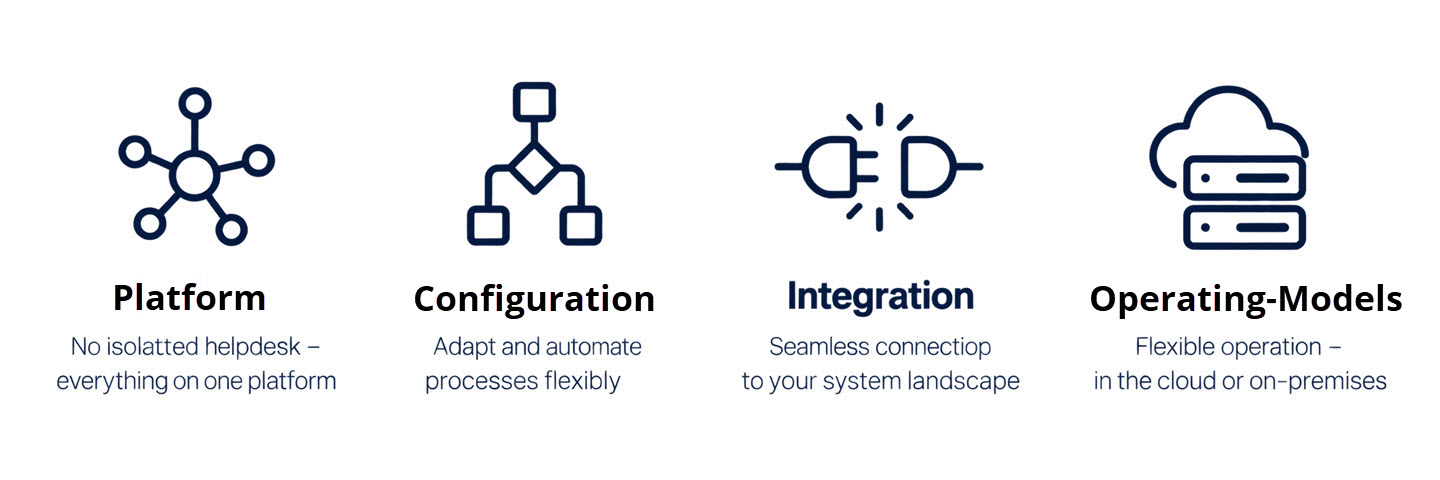
When choosing help desk software, it’s not just about whether tickets can be created and assigned.
It’s also crucial how well the solution integrates into existing structures and how easily it can be adapted to meet future requirements.
No Rigid Help Desk “Island”
EcholoN isn’t limited to a single help desk use case.
Support, service management, ITSM, and other specialized processes can be implemented on the same technical platform and interconnected.
This allows a help desk to serve as a starting point without permanently locking the organization into an isolated ticketing tool.
Extensively Configurable Processes
Forms, data structures, roles, views, rules, and workflows can be customized to the organization’s needs, depending on the edition and requirements.
This allows companies to leverage existing standard features while simultaneously mapping their own process requirements.
Integrate Existing Systems
ERP, CRM, SAP, monitoring, and other business systems do not necessarily need to be replaced by EcholoN.
Existing applications can remain part of cross-functional processes and provide the information needed for task processing.
Different operating models
Depending on infrastructure and IT strategy, EcholoN can be deployed in various operating and deployment scenarios:
- On-premises
- Cloud / SaaS
- Managed Service
- Hybrid scenarios
This means the help desk platform is not tied to a single operating model.
Which EcholoN Edition is right for the help desk?

The “Help Desk” use case does not automatically determine which EcholoN edition is required.
The decisive factor is the scope of functionality, configuration, and development that the company needs.
Express
For companies that primarily want to process tickets and service requests in a structured manner and get started with existing standard features.
Standard
For standardized service and business processes with additional process models, workflows, and platform features.
Professional
For organizations that want to extensively configure processes, workflows, forms, data structures, roles, and user interfaces themselves.
Enterprise
For companies that, beyond configuration, wish to develop their own specialized applications, modules, or software components based on the EcholoN Enterprise Application Framework.
The specific edition is therefore determined by the requirements and the desired future expansion phase—not solely by the term “help desk.”
Technical features alone do not indicate whether a help desk and service platform will actually be adopted within an organization.
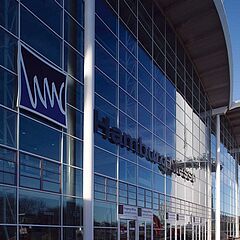
Hamburg Messe und Congress
At Hamburg Messe und Congress, EcholoN is used for IT service management.
According to the customer testimonial, approximately 99% of inquiries are now submitted directly through EcholoN.
This example demonstrates how a centralized service platform can become the go-to solution for users and support.
View the Hamburg Messe und Congress reference
Layout: Customer logo + actual screenshot or existing reference image. Right next to it, a brief statistic: “Approx. 99% of requests are submitted directly via EcholoN.”
Other companies rely on EcholoN
EcholoN is used by more than 400 customers for various service, support, and business processes.
What should companies look for in help desk software?
It’s not the longest list of features that determines whether a help desk solution is a good fit for your organization.
Before making a selection, there are five key questions you should answer.
1. Who will use the help desk?
Will it support internal employees, external customers, or both?
- This will determine, among other things, the forms, roles, communication channels, and self-service requirements.
2. How should inquiries be handled?
What intake channels, categories, priorities, responsibilities, response times, and escalation paths are needed?
- The software should support these processes in a transparent manner.
3. What information does the support team need?
Do customer, organizational, product, system, or other company data need to be incorporated into the processing?
- If so, it should be determined early on how existing applications and data sources can be integrated.
4. How customized are the processes?
Are standardized workflows sufficient, or do forms, roles, workflows, rules, and data structures need to be adapted to your organization?
- The required degree of customization influences the choice of platform and the appropriate product edition.
5. What will be needed in the future?
Will usage be limited to ticketing and help desk, or will self-service, service desk, ITSM, or other specialized processes be added later, for example?
- When making a selection, you should therefore consider whether future requirements can be accommodated within the same platform or whether additional systems will be required.
Frequently Asked Questions About Help Desk Software
What is help desk software?
Help desk software supports companies in the centralized collection, organization, and processing of support requests. Tickets are assigned to the appropriate agents, processing statuses are documented, and information related to communication, knowledge, deadlines, escalation, and analysis is consolidated.
What is the difference between a help desk and a ticket system?
A ticket system focuses primarily on the creation and tracking of tickets. A help desk supplements these functions by organizing operational support, for example through assigned responsibilities, communication, solution knowledge, prioritization, and escalation paths.
In practice, the lines between these two terms are not always clear-cut.
What is the difference between a help desk and a service desk?
A help desk typically focuses more on operational support for questions, problems, and incidents. A service desk integrates processes more closely into defined services, service requests, service levels, and broader service management processes.
Is EcholoN suitable for internal IT support and customer service?
Yes. EcholoN can be used for both internal IT and user inquiries as well as for external customer and support processes. Roles, forms, information, and processes can be configured according to the specific use case.
Can help desk processes be automated and customized?
Yes. EcholoN supports configurable forms, roles, rules, and workflows. Depending on the edition and requirements, tasks, assignments, notifications, deadlines, and escalations, for example, can be automated or customized.
What operating models does EcholoN offer?
EcholoN supports various operating and deployment scenarios—ranging from on-premises to cloud/SaaS, managed services, and hybrid scenarios. The most suitable model depends on the company’s infrastructure, security requirements, and IT strategy.
Get to Know the EcholoN Help Desk Through Your Processes
Help desk software should align with the actual workflows of your support organization.
In a personalized EcholoN demo, we can therefore use a specific support case to show you how your requirements can be implemented within the platform.
For example:
- Record a request via a designated channel
- Categorize and prioritize a ticket
- Assign the responsible team
- Manage deadlines and escalations
- Integrate existing solution knowledge
- Use self-service
- Automate recurring steps
- Integrate existing data and systems
- Analyze processing statuses and key metrics
- Outline potential future expansion stages
This way, you won’t just see a general product presentation—you’ll be able to evaluate EcholoN based on a help desk process relevant to your organization.