
The EcholoN Self-Service Portal is a software solution for companies that want to provide service requests, information, and digital processes centrally through a single portal. Customers, employees, and partners can submit requests themselves, find relevant information, view the status of their requests, and access services directly—without unnecessary follow-up questions or media breaks.
For service teams, this means fewer recurring standard inquiries, better-structured tickets, and clearer workflows in customer service, IT service management, HR service centers, facility management, and enterprise service management.
EcholoN Self-Service Portal: Software for Digital Service Processes
With the EcholoN Self-Service Portal, companies provide role-based portal views for different user groups. Depending on their permissions, customers, employees, or partners see exactly the forms, knowledge articles, service offerings, orders, status information, and support functions that are relevant to them.
The self-service portal software is integrated into the EcholoN service management platform. This allows requests to be processed directly as tickets, workflows to be started automatically, responsibilities to be managed, approvals to be tracked, and service processes to be documented in a traceable manner.
What is self-service portal software?
Self-service portal software provides customers, employees, or partners with a central digital gateway to services, information, and processes. Users can submit requests on their own 24/7, track the status of their requests, find answers in a knowledge base, fill out forms, place orders, or resolve common issues without having to contact the service team directly.
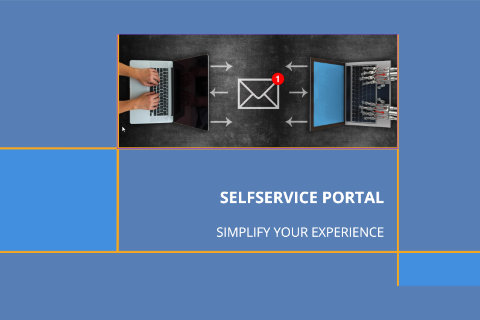
The difference from a simple FAQ page lies in process integration: A professional self-service portal is connected to a ticket system, workflow engine, knowledge base, role and permission structure, as well as other service desk and service management functions. As a result, self-service is not merely provided as a source of information, but is actively integrated into the company’s service processes.
For which areas is the EcholoN Self-Service Portal suitable?
The EcholoN Self-Service Portal can be used for various service areas. Depending on their role, permissions, and processes, users are provided with exactly the functions, information, and forms they need for their specific use case.
Customer Service
- In Customer Service, the portal enables the structured recording of customer inquiries, complaints, support cases, and service requests. Customers can access information, create tickets, provide feedback, and track the status of their requests.
IT Service Management
- In ITSM, the self-service portal supports the recording of incidents, service requests, purchase orders, and IT inquiries. Users are guided through categories, forms, and workflows so that requests can be forwarded directly to the appropriate group.
HR Service Center and Finance Service Center
- For HR and FS processes, the portal can be used as digital access to forms, applications, HR services, and internal information. Employees can submit requests themselves and track their processing status transparently.
Facility Management, Internal Services Including Maintenance and Repair
- Internal service areas such as Facility Management, including property management and maintenance, fleet management, purchasing, or general administrative services can also be managed through the portal. This creates a central service channel for recurring requests and standardized processes.
Key Features of the EcholoN Self-Service Portal Software
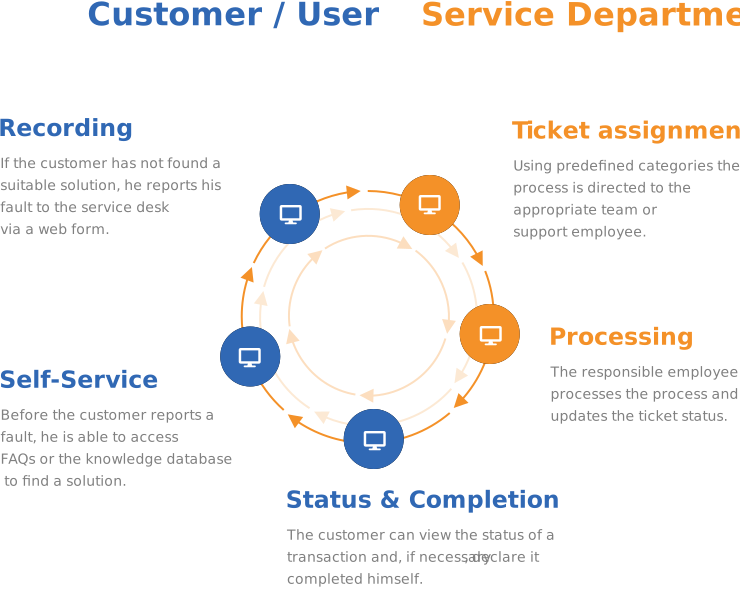
The EcholoN Self-Service Portal software consolidates key functions for customers, employees, partners, and service teams into a single digital interface. Users can submit requests on their own, access information, track the status of their requests, and independently initiate standardized service processes. This enables companies to reduce manual follow-up inquiries, streamline their service communications, and alleviate the workload on the relevant teams.
![[Translate to English:] Welche Funktionen gehören zu einem Selfservice Portal?](/fileadmin/user_upload/EcholoN-Software-Service-Portal-Selfhelp-Which-functions-belong-to-a-self-service-portal.jpg "[Translate to English:] Welche Funktionen gehören zu einem Selfservice Portal?")
Ticket Submission and Status Tracking
Customers, employees, and partners can submit inquiries, issues, complaints, or service requests directly through the self-service portal. Guided forms, categories, and required fields ensure that all relevant information is recorded in a structured manner.
After submission, users can track the processing status of their tickets. This reduces the need for follow-up inquiries by phone or email and ensures greater transparency throughout the entire service process. Service teams benefit from complete information, clear responsibilities, and faster processing.

Knowledge Base, FAQ, and Self-Help
Through the integrated knowledge base, FAQ sections, and self-help articles, users can find answers to common questions on their own. These include, for example, instructions, suggested solutions, product information, process guidelines, and internal support resources.
This reduces the number of recurring standard inquiries. Users receive help more quickly, while service staff gain more time for complex issues, personalized advice, and value-added tasks.

Role-Based Portals for Customers, Employees, and Partners
Not every user group needs the same information, forms, and services. Using roles and permissions, EcholoN controls which content, features, and processes are visible to customers, internal employees, partners, or departments.
This allows for the provision of different portal views: for example, a customer portal for support cases, an employee portal for internal services, or a partner portal for collaborative processes. As a result, the self-service portal remains clear, secure, and tailored to the specific use case.

Forms, Shopping Cart, Orders, and Approvals
Standardized forms help ensure that requests and requirements are recorded completely and in a traceable manner. Services, items, replacement parts, IT equipment, or internal services can be requested and ordered via a shopping cart or order function.
Requests requiring approval can be automatically routed to the appropriate approval processes. As a result, orders, internal services, and recurring requests are no longer handled in an unstructured manner via email, but are instead managed and documented digitally.

Search, Chatbot, and Automated Support
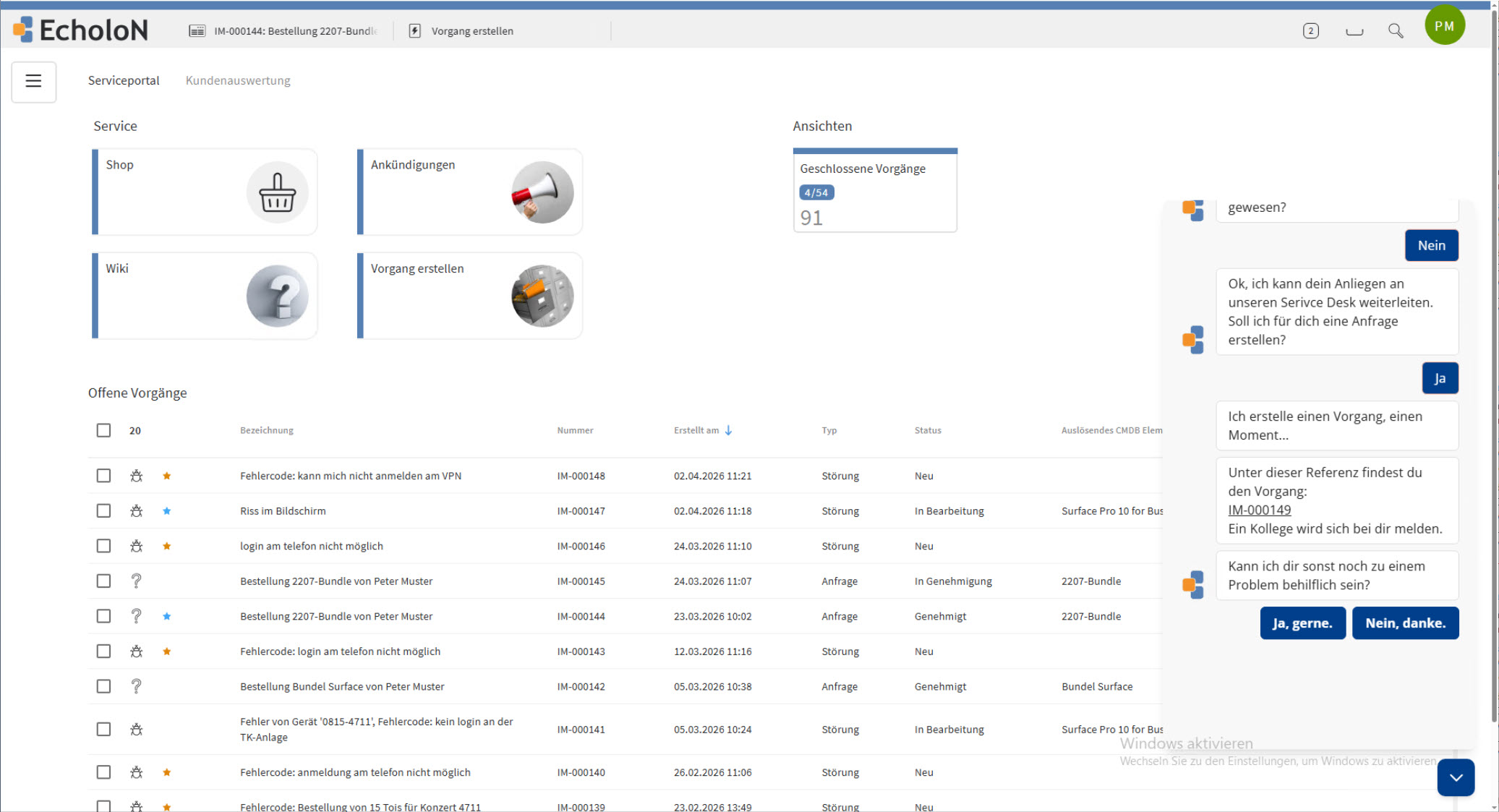
A powerful search function helps users quickly find relevant information, FAQ entries, knowledge base articles, or forms. In addition, chatbot features can automatically answer simple questions or guide users to the correct service process.
This improves user guidance within the portal and reduces unnecessary contact with the service team. Common issues can be resolved more quickly, standardized processes can be better managed, and service resources can be deployed more effectively.

Feedback, Ratings, and Service Quality
After a request is completed, users can provide feedback or rate the service quality. This gives companies feedback on the quality of service, clarity, response times, and satisfaction.
This information helps to improve service processes in a targeted manner. Recurring issues become more apparent, knowledge bases can be expanded, and workflows can be continuously optimized.
Benefits of Self-Service Portals for Businesses
Self-service portals reduce the workload on service teams, improve service availability, and provide a central digital access point for customers, employees, and partners. Instead of handling inquiries in an unstructured manner via email, phone, or individual departments, requests are managed through defined forms, categories, workflows, and knowledge base content.
Fewer Routine Inquiries in Customer Service
Many recurring questions can be answered directly within the portal via FAQs, a knowledge base, self-help articles, and guided processes. Users can find information on their own, check the status of their tickets, or initiate standard processes without direct contact with the service team.
- This reduces the number of simple follow-up inquiries. Employees gain time to focus on more complex issues, cases requiring in-depth consultation, and tasks with higher value.
Faster and More Structured Processing
Inquiries in the self-service portal are not submitted freely and incompletely via email, but are captured using structured forms. Required fields, categories, and predefined options ensure that relevant information is immediately available.
- This improves the quality of ticket creation and reduces follow-up inquiries. Service teams can assess and prioritize issues more quickly and forward them to the appropriate personnel.
Greater transparency for users and service teams
Customers, employees, and partners can track the status of their requests and gain greater transparency into ongoing processes. At the same time, service teams maintain an overview of open tickets, responsibilities, deadlines, and processing statuses.
- This reduces uncertainty on the user side and improves service management. Fewer status inquiries mean fewer interruptions to day-to-day operations.
Central Platform for Various Service Areas
A self-service portal can be used not only in customer service but also in IT service management, HR service centers, facility management, procurement, or enterprise service management. Different portals, roles, and permissions ensure that each user group sees only the relevant content, forms, and processes.
- This creates a central service channel for various departments without each department having to build its own siloed solutions.
Better Service Quality Through Knowledge and Feedback
Knowledge bases, FAQs, ratings, and feedback provide a foundation for continuous improvement. Companies can identify which questions arise frequently, which processes are unclear, and where users need additional support.
- These insights help expand knowledge content, improve workflows, and make service quality measurable.
Foundation for automation and digitization
A self-service portal enables service processes to be managed digitally. Inquiries, forms, orders, approvals, responses, and status information are recorded in a structured manner and can be processed further via workflows.
- In this way, the portal supports the digitization of customer service, internal services, and enterprise service management. Companies create a scalable foundation to reduce manual tasks, standardize processes, and deliver services more efficiently.
Integration with EcholoN Service Management
The EcholoN Self-Service Portal is not intended to be a standalone portal interface, but rather an integral part of the EcholoN Service Management platform. Requests, forms, orders, and feedback from the portal can be directly transferred into structured service processes.
If necessary, a request is automatically converted into a ticket. Categories, responsibilities, priorities, SLAs, and processing routes can be controlled via defined workflows. The knowledge base, FAQs, role model, permissions, and portal modules are all interconnected, ensuring that users see only the information and functions relevant to their specific use case.
As a result, the self-service portal is suitable not only for customer service but also for IT service management, HR service centers, facility management, and other enterprise service management processes. Companies create a central digital access point for various service areas while maintaining control over processes, responsibilities, and service quality.
The EcholoN Self-Service Portal - Overview - Screenshots
Self-service portal for standard ITSM users with a chatbot
SelfService-Portal in der Rolle: ITSM Standard Benutzer mit Ticketerfassung, Chatbot und Shop
Self-service portal: ITSM standard user with ordering via the shop
Self-service portal in the role: ITSM standard user with ticket creation, chatbot and shop with ordering process
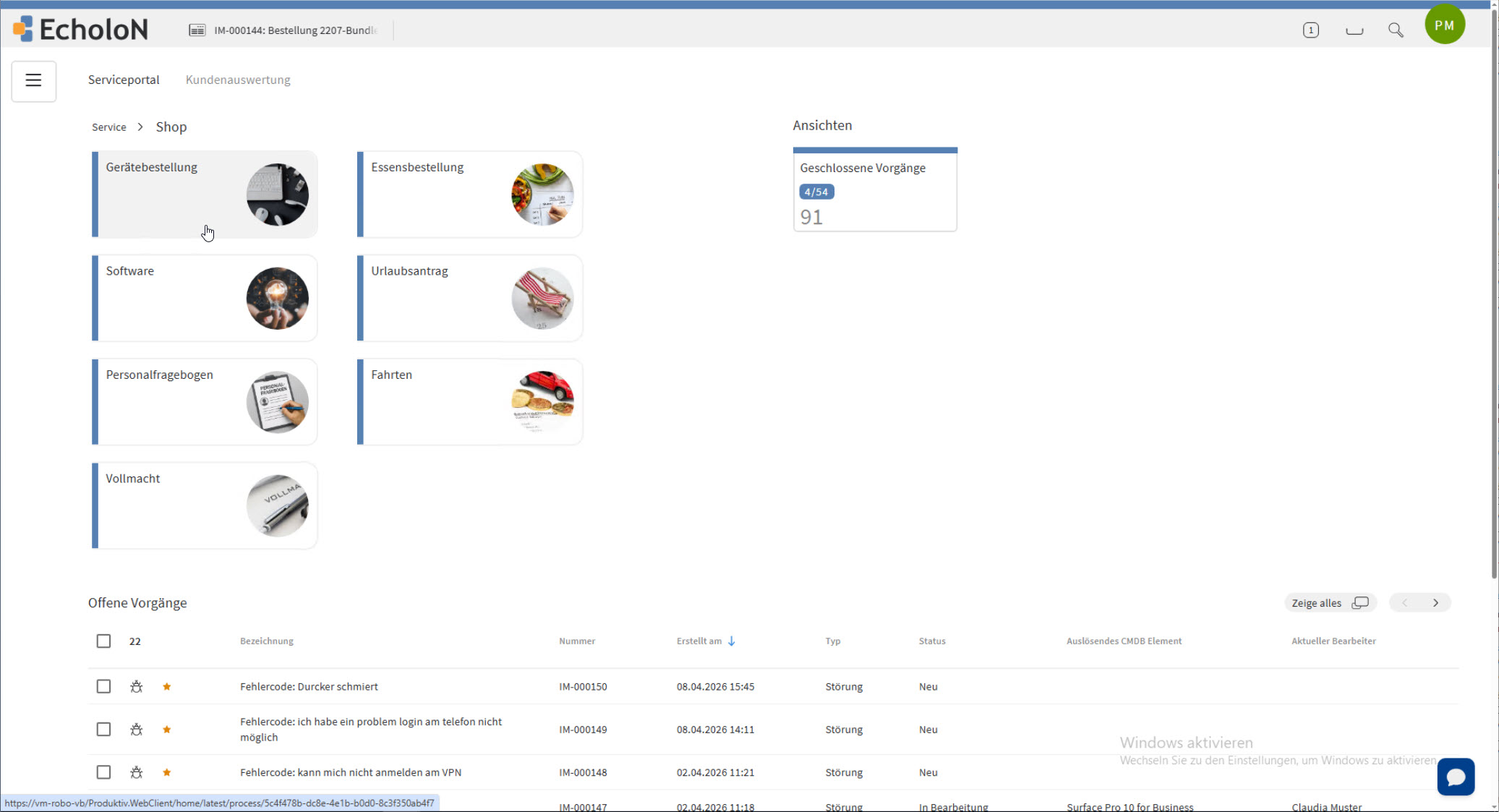
SelfService Portal HR
EcholoN SelfService Portal Role: HR Service Center Personnel with applications and forms
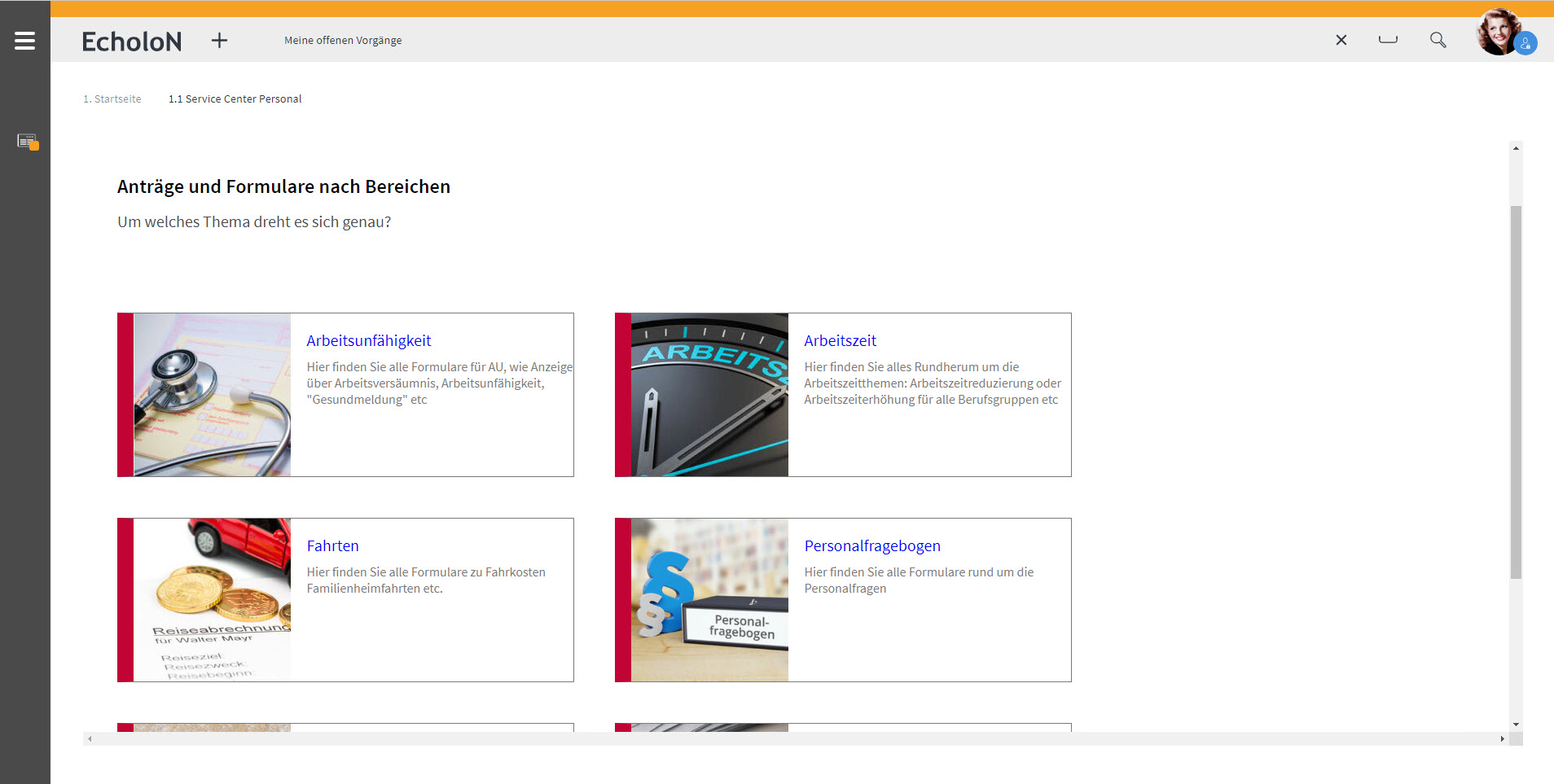
SelfService Portal Standard User
SelfService Portal in the role: Standard User with Ticket Entry and Project Collaboration
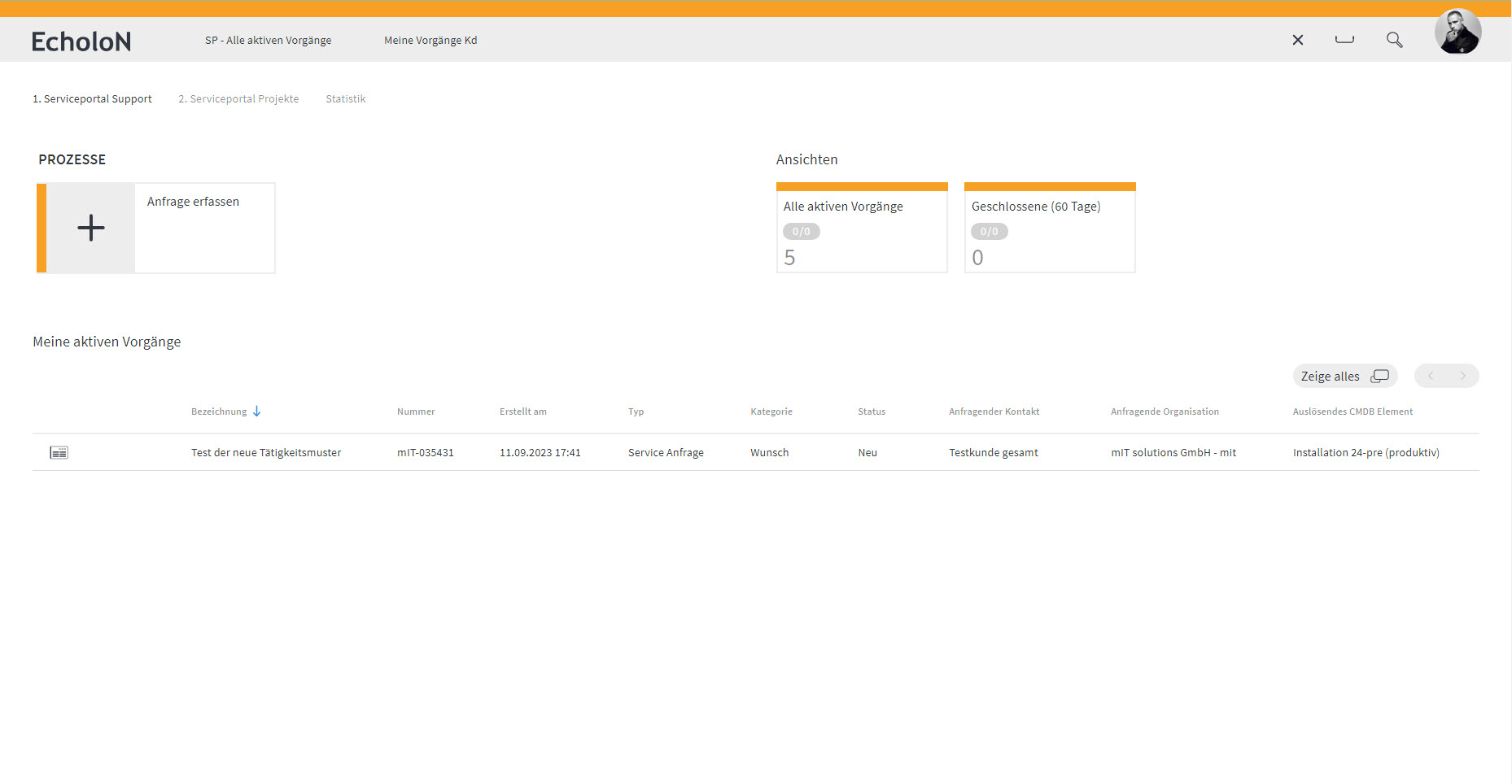
Application roles
The application roles are used to decide which users / customers are to have access to the portal with which modules. Depending on the application role, it can be set which modules are provided and to what extent.
Ticket entry
Ticket entry is usually controlled automatically via so-called categories. The advantage of this is that the user is guided during ticket entry and the EcholoN Workflow Engine assigns the ticket to the correct group. When entering the ticket, attachments, e.g. screenshots, can also be added directly.
Ticket processing
A configuration dialogue can be used to set which objects and properties are to be searched for. When displaying the results, data records linked to the object are also shown. For example, the corresponding tickets, SLAs and configuration items (CIs) are displayed directly for the contact.
Ticket closure
By defining categories that are interdependent, EcholoN can already set all relevant parameters during ticket entry (e.g. priority, responsible group, schedule, SLA). The keyword management is used to assign subject areas.
Rating system
The customer ratin system is used for feedback control from the user side towards the service desk. The evaluation criteria are freely adjustable.
Messageboard / Message Ticker
With the message board, the support team can post current information for the users. A start and end date can be stored for each message board entry. The message ticker permanently provides current information.
Associative knowledge database and FAQs
In addition, access to the knowledge database and the current FAQs can be enabled for selected users. This gives the user the opportunity to inform himself in advance and thus find a possible solution to his query. The FAQs show the frequently asked questions and their appropriate answers. Each knowledge database entry can be made available with any information structure.
Shopping cart
The ordering process can be mapped directly via the shopping cart function. If, for example, articles are subject to approval, the corresponding approval process is triggered. The approval process can be developed individually, depending on requirements and needs.
Free and individual portal modules
The EcholoN Service Portal also allows you to create individual modules. In addition to the classic self-service functions, company modules can be provided, e.g. for the HR Service Centre Personnel (SCP), project and task management, retail solution, fleet management, request fulfilment etc.
Self-Service, Selfservice, and Self-Service Portal: Defining the Terms
The terms “self-service,” “selfservice,” and “self-service” are often used interchangeably. They generally refer to the ability of users to easily access information or services on their own, without having to contact a staff member directly.
A self-service portal goes a step further: It consolidates these functions into a single, centralized software interface. These include, for example, ticket submission, FAQs, knowledge base, status tracking, forms, orders, approval processes, and feedback functions.
For companies, therefore, it is not only the provision of individual self-service content that is crucial, but also its integration into existing service processes. This is exactly where the EcholoN Self-Service Portal software comes in.
Frequently Asked Questions About Self-Service Portal Software
What is self-service portal software?
Self-service portal software provides customers, employees, or partners with a central digital gateway to services, information, and processes. Users can submit requests, track tickets, search for answers, fill out forms, or place orders without having to contact the service department directly.
What are the benefits of a self-service portal?
A self-service portal reduces recurring standard inquiries, lightens the workload on service teams, and improves the accessibility of services. Inquiries are recorded in a more structured manner, users gain greater transparency into the processing status, and companies can automate service processes to a greater extent.
For which areas is the EcholoN Self-Service Portal suitable?
The EcholoN Self-Service Portal is suitable for customer service, IT service management, HR service centers, facility management, internal services, partner portals, and other enterprise service management scenarios. Content, forms, and processes can be made available differently depending on the user group.
Can the self-service portal be connected to a ticketing system?
Yes. The self-service portal is integrated into the EcholoN Service Management Platform. Requests from the portal can be recorded as tickets, categorized, prioritized, and forwarded to the appropriate teams via workflows.
Does the portal also support FAQs and a knowledge base?
Yes. Users can search for solutions themselves via FAQ sections, the knowledge base, and self-help content. This allows common questions to be answered before a ticket is created or a service team is contacted.
Can different user groups be given different portal views?
Yes. Roles and permissions can be used to control which users see which modules, forms, information, and processes. This allows separate portal views to be provided for customers, employees, partners, or individual departments.
Is the self-service portal also suitable for internal employees?
Yes. In addition to customer portals, the EcholoN Self-Service Portal can also be used as an employee portal. Typical use cases include IT requests, HR services, facility-related issues, internal orders, approvals, or general service processes.
What features does self-service portal software include?
Typical features include ticket creation, status tracking, a knowledge base, FAQs, self-help, role-based portal views, forms, a shopping cart, orders, approval processes, search, AI and chatbot support, feedback, and ratings.
How does a self-service portal support digital transformation?
A self-service portal digitizes recurring service processes by capturing requests, forms, orders, approvals, and feedback in a structured manner and processing them via workflows. This reduces the need for manual coordination and enables services to be managed centrally.
What sets the EcholoN Self-Service Portal apart from a simple FAQ page?
An FAQ page primarily provides information. The EcholoN Self-Service Portal links information to specific service processes. Users can not only search for answers but also create tickets, fill out forms, place orders, track processing status, and provide feedback.
What other tools does a self-service portal offer?
In addition to a knowledge base, a self-service portal also offers other tools that help customers handle their inquiries. These include chatbots that can answer customer questions using AI technology. Furthermore, customers can place orders, pay invoices, and perform other transactions through the portal.
How can a self-service portal meet user expectations?
To meet user expectations, a self-service portal must be user-friendly and easy to use. It should have a modern user interface and a clear, logical structure that allows users to quickly access the information and features they need.
- In addition, the portal should offer intuitive navigation elements and search functions to help users find their way around and locate the information or features they need.
- The self-service portal should have a responsive design to ensure it displays properly on various devices and screen sizes.
- Content should be presented clearly and comprehensibly, without unnecessary technical jargon or complicated instructions. Graphics and visual elements can be used to illustrate information and enhance the user experience.
- It is also important for the portal to offer a simple and intuitive registration and login feature so that users can quickly access their personal accounts and submit their requests or questions.
- Another feature that makes a self-service portal user-friendly is the ability to provide feedback and ratings, such as CSAT, NPS, and others. This allows users to share their experiences and report any issues, enabling the portal to be continuously improved.
- The self-service portal should also offer efficient technical support to help users quickly and reliably with any problems or questions. This can be achieved through live chat, an FAQ section, or email support.
Overall, when designing a self-service portal, it is important to keep users’ needs and expectations in mind and to incorporate their feedback into the continuous improvement process. Through a user-friendly and intuitive platform, companies can increase customer satisfaction and improve their efficiency.