

A workflow engine is the execution component of a workflow management system. It processes defined rules and events, controls the sequence of process steps, assigns tasks, and triggers automated actions.
This allows recurring workflows to be executed in a structured manner, monitored, and partially or fully automated. The workflow engine ensures that the right task is executed at the right time within a process.
This article explains how a workflow engine works, what tasks it performs, and how it differs from a workflow management system, BPMN, and robotic process automation.
The EcholoN Workflow Engine Software demonstrates how these functions are implemented in a specific software solution.
Workflow Engine Explained Simply: Definition and Function
A workflow describes a predefined or rule-based sequence of tasks, decisions, and system actions. Both people and various software applications can be involved in processing these tasks.
The workflow engine handles the technical control of this process. For example, it checks:
- Which event triggers the workflow?
- Which process step should be executed next?
- What conditions must be met?
- Who is responsible for a task?
- What information is required?
- What action should a connected system perform?
- When is the workflow complete?
The workflow engine manages the current status of each running process. Depending on this status, the available data, and the defined rules, it determines how the process will continue.
Typical actions of a workflow engine include:
- Creating and assigning tasks
- Forwarding requests for review or approval
- Sending notifications
- Monitoring deadlines and follow-ups
- Triggering escalations
- Checking and modifying data
- Generating documents
- Calling external applications
- Updating status values
- Starting follow-up processes
The workflow engine is thus the controlling and executing entity within a digitally mapped workflow.
What is the difference between a workflow engine and a workflow management system?
The terms workflow engine and workflow management system (WFMS for short) are often used interchangeably. Technically, however, they do not describe exactly the same thing.
The workflow engine executes the defined process logic. It processes rules, events, tasks, and state changes.
A workflow management system additionally includes the functions required for creating, managing, and monitoring workflows. These may include, for example:
- graphical modeling of workflows
- form design
- user and role management
- process version administration
- monitoring of running workflows
- evaluation of process data
- configuration of interfaces
- testing and deployment of new workflows
Simply put:
The workflow management system provides the entire working environment. The workflow engine executes the processes defined within it.
In practice, these two components are often closely linked. For this reason, the term “workflow engine” is sometimes also used to refer to a complete workflow software solution.
How does a workflow engine work?
The specific technical implementation may vary depending on the software. However, the basic principle remains similar.
-
1. A workflow is defined
First of all, the tasks, decisions, rules and events that make up the process are defined.
For example, a workflow might begin with the receipt of an application. It is then checked what type of application it is, who needs to process it and whether approval is required.
The workflow definition thus describes the general sequence of events. It serves as the template according to which individual processes are subsequently carried out.
-
2. An event triggers the workflow
A workflow can be triggered by various events, such as:
- Submission of a form
- Receipt of an email
- Creation or modification of a record
- Reaching a specific point in time
- Invocation via an interface
- Completion of a previous process
- Manual action by a user
When the workflow starts, a specific, independent process run begins.
-
3. A workflow instance is created
Each individual run that is initiated is referred to as a workflow instance.
For example, when a vacation request is submitted, the workflow engine creates a separate instance for that request. This instance contains specific information such as:
- Requester
- Time period
- Responsible manager
- Current processing status
- Pending tasks
- Previous decisions
- Related documents
- Deadlines and dates
Multiple requests can be processed simultaneously based on the same workflow definition. Each instance is managed independently.
-
4. Rules and permissions are checked
Before executing a process step, the workflow engine checks the defined conditions.
These include, for example:
- Is the current process status valid?
- Is all required information available?
- Is the user authorized to process the task?
- Has a specified threshold been exceeded?
- Is additional approval required?
- Has a deadline been reached or exceeded?
- Which processing path should be selected based on the data?
Depending on the result, the intended process step is executed or an alternative path is selected.
-
5. Tasks and system actions are carried out
A process step can be a task for a user or an automated action.
Examples of user tasks include:
- Verifying information
- Filling in data
- Making a decision
- Approving a request
- Uploading a document
- Responding to a query
Automated system actions can include, among others:
- Sending an email or notification
- Retrieving data from an application
- Creating a data record
- Changing a status
- Generating a document
- Calling an external web service
- Transferring information to another system
Upon completion, the workflow engine updates the instance’s status and determines the next process step.
-
6. The process is monitored and completed
During execution, the workflow engine logs relevant status changes and processing steps.
This makes it possible to track:
- which tasks have already been completed
- which tasks are still pending
- who made a decision
- where delays occurred
- what the current status is
- when a process began and ended
Once all scheduled steps have been completed, the engine terminates the workflow instance.
“A workflow engine turns defined procedures into reliably executable processes—with clear responsibilities, traceable decisions, and less manual coordination.”
Jochen Möller
What tasks does a workflow engine perform?
A workflow engine can coordinate various types of tasks within a business process.
Control process steps
The engine ensures that tasks and actions are executed in the intended order. It can handle linear workflows as well as parallel or conditional process paths.
Assign responsibilities
Tasks can be assigned to the appropriate personnel based on roles, teams, organizational units, or existing process information.
Evaluating decisions
Defined conditions determine how a workflow proceeds. For example, the amount of a sum may determine whether additional approval is required.
Monitoring deadlines
Processing times can be defined for tasks and process steps. If a deadline is exceeded, the workflow engine can send a reminder, trigger an escalation, or reassign the task.
Connecting Systems
Information can be transferred between different applications via APIs, connectors and appropriate data integration.
The specific integration depends on the available interfaces of the respective target system and the requirements of the process.
Documenting Processing Status
Status changes, decisions, and completed tasks can be logged. This increases traceability and supports the subsequent evaluation of the process.
Workflow engines are particularly well-suited for recurring, rule-based, or multi-step processes.
Approval Processes
A request is entered, reviewed, and forwarded to the appropriate personnel based on the amount, department, or type of request. Once a decision has been made, the requester is notified and any necessary follow-up actions are initiated.
Employee Onboarding
When a new employee joins the company, tasks for Human Resources, IT, the relevant department, and facilities management can be automatically generated. These include, for example, the provision of work equipment, user accounts, and access permissions.
Service Requests
An incoming request is categorized, prioritized, and assigned to the appropriate processing team. Deadlines, follow-up inquiries, escalations, and status updates are managed within the workflow.
Invoice Verification
Invoice data is entered or imported. The workflow then verifies formal requirements and forwards the invoice for departmental approval based on the amount or cost center.
Contract Review
A draft contract goes through defined review and approval stages. Depending on the contract type, value, or risk class, different departments may be involved.
Complaint Handling
A complaint is logged and classified based on its characteristics. The subsequent process depends on the product, urgency, potential warranty coverage, and the required decision.

Why do companies use workflow engines?
Workflow engines help companies execute processes in a consistent and traceable manner.
Less manual coordination
Tasks do not have to be reassigned via email, phone, or verbal communication for every step. The workflow engine handles the assignment based on predefined rules.
Clear responsibilities
For each process step, you can specify which role or organizational unit is responsible. This makes it clearer who needs to handle a task.
Consistent Workflows
Recurring processes are handled according to the same rules. Exceptions can be specifically defined as separate process paths.
Improved Traceability
The current processing status remains visible within the workflow. Decisions, tasks, and status changes can be documented depending on the configuration.
Faster Process Adaptation
If responsibilities, rules, or business requirements change, digitally modeled workflows can be specifically adapted. This requires that the software used supports controlled adaptation and versioning.
Reduced Burden of Routine Tasks
Automated notifications, data transfers, and status updates reduce repetitive administrative work. Business decisions can still be made by the responsible employees.
Workflow Engine and BPMN: What Is the Connection?
The Business Process Model and Notation, or BPMN for short, is a standardized graphical notation for representing business processes.
BPMN provides symbols and rules that can be used to describe, among other things, the following elements of a process:
- Events
- Tasks
- Decision points
- Process paths
- Messages
- Involved roles or organizations
It is important to distinguish between modeling and execution.
A BPMN modeler is used to create process diagrams. A workflow engine, on the other hand, executes the technically executable components of a provided process model.
Not every graphical BPMN representation is automatically executable. Likewise, not every workflow engine uses BPMN. Some systems use their own modeling methods or process definitions.
When selecting software, you should therefore check whether BPMN is used solely for documentation purposes or whether the created models can actually be executed by the engine.
What is the difference between a workflow engine and RPA?
A workflow engine and Robotic Process Automation (RPA) have different focuses.
A workflow engine coordinates an entire process. It manages tasks, rules, decisions, deadlines, users, and the systems involved.
RPA, on the other hand, often automates individual, repetitive user actions within existing applications. For example, a software robot can extract data from one user interface and transfer it to another application.
Put simply:
- Workflow engine: controls the overarching process
- RPA: automates individual operational or processing steps
Both technologies can be used together. For example, the workflow engine determines when a task is to be executed. An RPA solution then handles a specific automated step.
However, where stable interfaces are available, direct system integration via APIs is often more robust than automation via user interfaces.
How do companies find the right workflow engine?
Before selecting a workflow engine, you should first assess your own processes and requirements. A feature list that is as long as possible says little on its own about whether a solution is a good fit for your company.
Important selection criteria include:
Supported Process Types
You should verify whether the software supports only simple, linear workflows or also long-running, case-based, and not entirely predictable processes.
Modeling and Usability
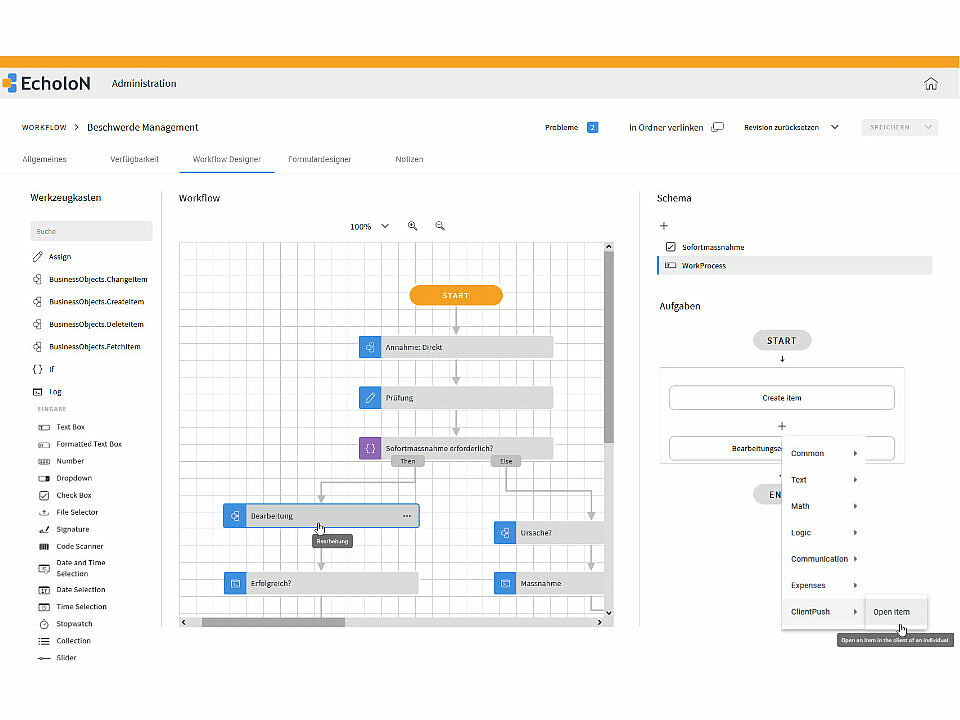
Business and technical users should be able to model, review, and customize processes in a way that is easy to understand. A key factor here is how tasks, rules, forms, and system actions are linked together.
Roles and Permissions
The software should be able to map existing organizational structures. This includes roles, teams, substitutes, and dynamically determined responsibilities.
Forms and User Tasks
Processes involving human participation require appropriate input forms and task views. Content should be able to be provided in a manner appropriate to the respective processing step.
Interfaces and Integration
Existing applications, data sources, and services must be able to be integrated into the workflows. In doing so, attention should be paid not only to general integration promises but also to the specific interfaces.
Monitoring and Traceability
Ongoing processes, open tasks, and potential delays should be displayed transparently. The required level of logging depends on organizational and business requirements.
Versioning and Deployment
Workflows change over time. Therefore, the software should enable controlled development, testing, and deployment of new versions.
Consulting and Operations
In addition to technical features, implementation, customization, training, support, and the desired operating model must also be taken into account.
Companies looking to implement these requirements within a centralized platform can find more information on the product page for the EcholoN Workflow Engine Software.
Let’s work together to explore how your business processes can be digitally mapped and automated using the EcholoN Workflow Engine.
Frequently Asked Questions About the Workflow Engine
What is a workflow engine?
A workflow engine is a software component that executes defined workflows. It processes events, checks rules and permissions, manages the status of a process, and triggers the specified tasks or system actions.
What is the difference between a workflow engine and a workflow management system?
The workflow engine handles the technical execution of the defined process logic. A workflow management system also includes functions for modeling, administering, monitoring, and evaluating workflows.
What is a workflow instance?
A workflow instance is a specific, initiated run of a defined workflow. For example, when a vacation request is submitted, this creates a separate instance with its own status, involved parties, and associated process data.
Which processes can be automated with a workflow engine?
Recurring or rule-based processes are particularly suitable, such as approvals, authorizations, onboarding processes, service requests, audits, notifications, and cross-system data processing.
Can a workflow engine incorporate manual tasks?
Yes. A workflow engine can coordinate automated system actions and tasks for human agents within a single workflow. Once a user task is completed, the engine continues the workflow according to the defined rules.
What is the difference between a workflow engine and RPA?
A workflow engine coordinates the entire process and manages tasks, decisions, deadlines, and involved systems. Robotic Process Automation (RPA), on the other hand, typically automates individual repetitive operations within existing applications.
Does a workflow engine have to support BPMN?
No. BPMN is a standardized notation for modeling business processes, but it is not used by every workflow engine. What matters is whether the modeling approach used maps the business requirements and can be executed by the respective engine.