

A CMMS is software used to plan, manage, and document maintenance work. Companies use it to manage, among other things, equipment, maintenance, inspections, repairs, and work orders.
The abbreviation CMMS stands for Computerized Maintenance Management System. In German, the terms “maintenance software” or “maintenance planning and control system” are often used. A CMMS consolidates maintenance-related information and helps the responsible employees organize tasks in a traceable manner.
This article explains the features of a CMMS, the benefits the software can offer, and how CMMS, EAM, ERP, and CAFM differ. If you’re already looking for a specific solution, you can explore the features of the EcholoN CMMS and maintenance software.
What does a CMMS do?
A CMMS digitally tracks recurring and unplanned maintenance tasks. These typically include:
- Asset and equipment data: Record information about machines, devices, locations, and components.
- Maintenance planning: Organize scheduled tasks and recurring appointments.
- Work orders: Creating, assigning, prioritizing, processing, and completing tasks.
- Fault and repair documentation: Recording the cause, action taken, and result.
- History: Tracking which tasks were performed on a piece of equipment and when.
- Material and spare parts information: Accounting for the resources required in connection with maintenance tasks.
- Reports: Analyzing documented processes based on defined metrics.
The exact scope of functions varies depending on the software and configuration. What is crucial is that the information about the facility can be linked to the respective work order and its processing.

How does a CMMS support the maintenance process?
A typical workflow begins with a scheduled maintenance appointment or a reported malfunction. This is converted into a task or work order that contains the information needed to complete the job. After the work is performed, the time, results, and other relevant details are documented.
A CMMS can support this process in several steps:
-
1. Assign to equipment
The task is assigned to the affected machine, piece of equipment, or component.
-
2. Plan the work
Scope, deadline, priority, and responsibility are defined.
-
3. Process the order
Employees receive the information relevant to their task and report back on the status of the work.
-
4. Document the results
Work performed and findings are recorded in a traceable manner for the asset.
-
5. Evaluate the history
The documented history can be used for planning and analysis.
The extent to which these steps are automated depends on the processes, roles, and data of the respective organization.
What benefits can a CMMS offer?
A CMMS does not replace a company’s maintenance strategy. However, it can help organize processes and information more reliably.
Better overview of equipment and work orders
When work orders, equipment information, and maintenance histories are systematically recorded, those responsible can more easily identify which tasks are planned, pending, or completed.
Structured maintenance planning
Recurring maintenance tasks can be organized in advance. This simplifies the preparation of personnel, time slots, and required resources. The specific triggers depend on the maintenance concept and the available data.
Traceable documentation
A digital history helps track past malfunctions and corrective actions. This is helpful when investigating recurring problems or justifying maintenance decisions.
Basis for Key Metrics
A CMMS can provide data for evaluating maintenance processes. Which key metrics are actually reliable depends on how completely and consistently the relevant processes are documented. A decision-making guide with examples follows below.
What maintenance strategies can a CMMS support?
A CMMS can manage various types of maintenance work. The software does not determine which strategy is technically correct; rather, it supports the planning and documentation of these strategies.
- Corrective Maintenance: Action is taken after a fault or malfunction has been detected.
- Preventive Maintenance: Maintenance tasks are scheduled based on fixed time intervals or usage-based rules before a failure occurs.
- Condition-Based Maintenance: Measurement values or condition data are used to determine whether an inspection or corrective action is necessary.
- Predictive Maintenance: Data is analyzed to deduce probable future conditions or potential maintenance needs. This requires suitable data and appropriate analytical or predictive logic.
Learn more about preventive maintenance and predictive maintenance.
CMMS, EAM, ERP, and CAFM: What Are the Differences?
These terms overlap to some extent but have different areas of focus. Which systems a company needs depends on its tasks, processes, and existing applications.
| System | Typical Focus |
|---|---|
| CMMS | Planning and documentation of maintenance, malfunctions, repairs, and work orders |
| EAM | Management of equipment and assets throughout their lifecycle, from procurement to decommissioning |
| ERP | Cross-functional business processes such as finance, procurement, human resources, and materials management; maintenance may be part of this |
| CAFM | Software to support facility management, such as for buildings, spaces, building services, and facility processes |
A CMMS can be used standalone or integrated with ERP, EAM, and CAFM systems. The specific scope of functions may vary depending on the provider and solution. Integration also depends on the available data and interfaces.
Facility management refers to the range of tasks related to buildings and facilities; CAFM refers to software that supports these facility management processes.
Selecting a CMMS and Planning Implementation
Clarify Requirements Before Comparing Software
Before comparing software, it should be clear which maintenance issues need to be resolved and which processes the software must support. These questions help organize requirements:
- Which assets, equipment, and locations need to be managed?
- How are scheduled maintenance, inspections, and breakdowns currently organized?
- What information do employees need to process a work order?
- What feedback and documents should be available in the asset history?
- What data comes from ERP, production, or other line-of-business systems?
- Are mobile processing, offline use, or specific roles and approvals required?
- Which key performance indicators should be analyzed, and is the necessary data available?
When evaluating options, companies should distinguish between standard features and the need for customization. A written requirements profile makes proposals more comparable and highlights which data, interfaces, or process changes must be clarified before implementation.
Plan the Implementation in Phases
Implementing a CMMS involves more than just the software. Asset master data, roles, work procedures, and the quality of existing documentation all influence how effectively the system can be used in day-to-day operations. A phased approach can include the following stages:
- Define goals and scope: Determine which assets and processes will be included first.
- Prepare data: Review asset identifiers, locations, maintenance rules, and available history.
- Define workflows: Establish responsibilities, approvals, feedback, and completion criteria.
- Determine interfaces: Clarify which system serves as the primary source for asset, material, or order data.
- Conduct a pilot: Test a limited set of assets or a specific process and incorporate feedback from employees.
- Evaluate results: Review usage, data quality, and agreed-upon metrics.
Clear data ownership and the involvement of future users are important prerequisites for a successful implementation.
What key performance indicators (KPIs) can be derived from CMMS data?
A KPI is only as meaningful as the underlying data and definitions. The following table provides examples of the information required for selected maintenance KPIs. Calculation rules may vary depending on the company and specific use case.
| Key Performance Indicator | Required Data What | It Is Used For |
|---|---|---|
| PM-Compliance | Scheduled preventive maintenance tasks, due dates, and documented completion | Percentage of maintenance tasks completed within the specified timeframe |
| MTTR | Start and end times of repairs or troubleshooting; defined start and end times | Average time to resolve a failure; the exact definition must be specified |
| MTBF | Documented outages and uptime, or intervals between outages | average time between failures |
| Maintenance Backlog | Pending work orders, due dates, status, and, if applicable, priority | scope and age of work not yet completed |
| Maintenance Costs per Asset | Labor hours, material and spare part costs, as well as external services, allocated to an asset | comparison of maintenance expenses across assets or time periods |
Additional metrics such as system availability, OEE, unplanned outages, and the ratio of planned to unplanned work require additional, consistently recorded operational and production data. The EcholoN article on Metrics for Maintenance and Repair provides an in-depth overview.
Frequently Asked Questions About CMMS
What does CMMS stand for?
CMMS stands for Computerized Maintenance Management System. It refers to software that helps companies plan, manage, and document maintenance work.
What features does a CMMS have?
Typical features include asset management, maintenance planning, work order management, documentation of malfunctions and repairs, asset history, and reports. The specific scope depends on the particular software and configuration.
Is a CMMS the same as an EAM?
No. A CMMS focuses primarily on maintenance tasks and work orders. EAM also considers the broader lifecycle of assets, such as procurement, operation, and decommissioning.
Can a CMMS be integrated with an ERP system?
Yes, many CMMS solutions can exchange data with ERP or other enterprise systems. It should be clarified in advance which application takes precedence for which data and which interfaces are available.
Does a CMMS support predictive maintenance?
A CMMS can incorporate condition or analysis results into maintenance processes. Predictive maintenance requires suitable machine or sensor data and appropriate predictive logic. The scope and technical implementation vary depending on the solution and use case.
CMMS Software from EcholoN
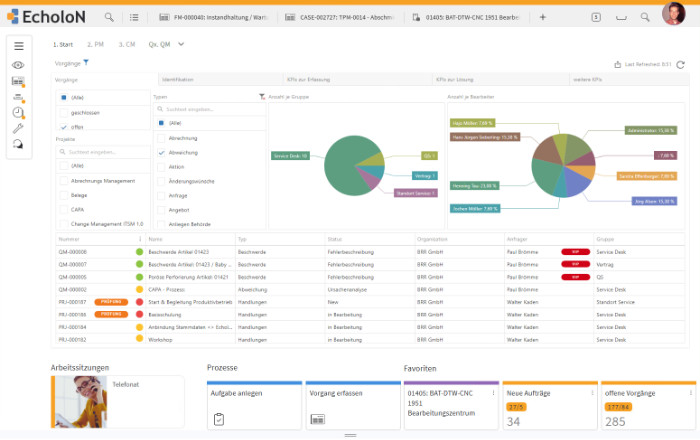
EcholoN helps companies link maintenance, inspections, malfunctions, and work orders to the associated equipment information and processes. Maintenance rules, responsibilities, data sources, and feedback can be customized to fit each specific workflow.
If you’d like to learn how EcholoN can map your maintenance processes, visit the page on EcholoN’s CMMS and maintenance software for an overview of its applications and features.